


Have you ever tried to send an important document through email, only to see a red warning message saying “File too large”? It is a frustrating moment that many of us face. Whether you are a student submitting a project, a teacher sharing lessons, or a professional sending a report, large PDF files can slow you down.
The good news is that you don’t have to delete pages or ruin your pictures to make the file fit. You can use a Free PDF Compressor. In this guide, we will learn everything about how this tool works, why it is helpful, and how you can use it like a pro.
What is a PDF Compressor?
Think of a PDF file like a suitcase. Sometimes, we pack so many things into a suitcase that it becomes too heavy to carry and won’t close. A PDF Compressor is like a magic helper that reorganizes everything inside the suitcase so it closes easily and feels lighter, but all your clothes (your data) stay exactly where they belong.
In technical terms, a PDF compressor looks for parts of the file that take up too much space. It “squeezes” high-resolution images and removes hidden data that you don’t actually see when reading the document. The result is a much smaller file that looks identical to the original.
Why Should You Use a Free PDF Compressor?
You might wonder, “Why not just leave the file as it is?” Here are the most important reasons why shrinking your PDF is a smart move:
1. Easy Email Sharing
Most email services, like Gmail or Outlook, have a limit on how big a file can be. Usually, it is around 25MB. If your PDF is 30MB, it simply won’t go through. Compressing it down to 5MB makes it fly through the internet instantly.
2. Faster Uploads and Downloads
Large files take a long time to travel. If you are uploading a resume to a job site or a homework assignment to a school portal, a smaller file uploads in seconds instead of minutes. This is especially helpful if your internet connection is a bit slow.
3. Saving Storage Space
Whether it is on your laptop, your phone, or your Google Drive, space is limited. If you have 100 large PDF files, they might take up all your room. If you compress them, you can fit five times as many files in the same amount of space!
4. Better for Websites (SEO Benefit)
If you are putting a PDF on a website for people to download, Google watches how fast that PDF loads. Small files make your website faster. When a website is fast, Google ranks it higher, which means more people will find your work.
How Does the “No Quality Loss” Magic Work?
The biggest fear people have is: “If I make the file smaller, will it look blurry?”
The answer is No, as long as you use a high-quality tool. Modern PDF compressors use a technology called “Lossless Compression.” Here is how it works in simple steps:
- Removing Redundancy: The tool looks for repeated patterns in the code of the file and replaces them with shorter codes.
- Image Optimization: Instead of a giant 4K photo, the tool adjusts the image to be exactly the size of the page. It looks the same to the human eye, but the computer sees it as a much lighter image.
- Font Cleaning: Sometimes PDFs carry extra data about fonts that aren’t even used. The tool cleans this out.
How to Use the Free Online PDF Compressor (Step-by-Step)
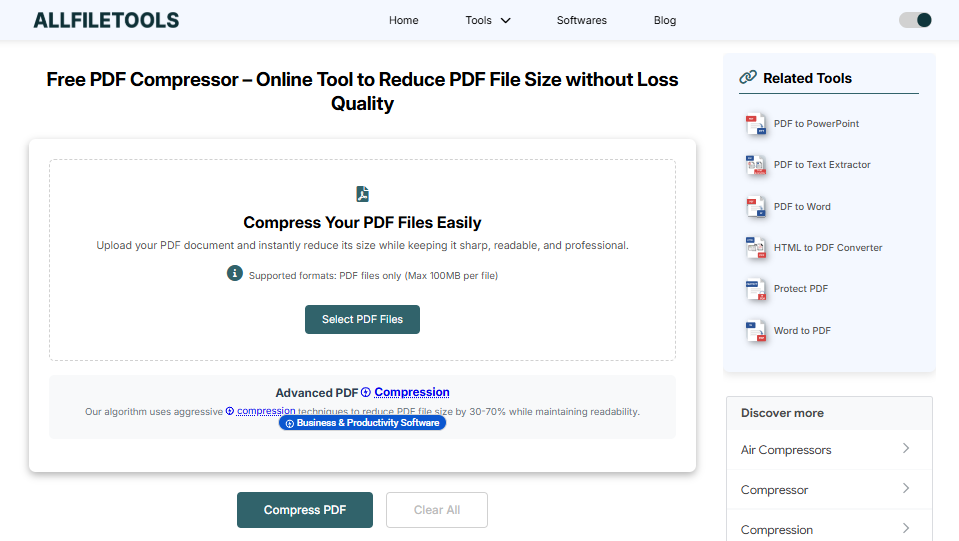
Using this online tool is very easy. You don’t need to be a computer expert. Just follow these simple steps:
Step 1: Open your web browser and go to a trusted website like AllFileTools.com. And use this Tool Free PDF Compressor
Step 2: Click the “Select PDF Files” or “Upload” button to pick the PDF from your device.
Step 3: Choose the “Compress” option to start reducing the size of your file.
Step 4: Click the “Convert” or “Compress Now” button and wait a few seconds for the tool to work.
Step 5: Click the “Download” button to save your new, smaller PDF file to your computer or phone.
Is Using an Online Tool Safe?
Many people worry about their privacy. “If I upload my bank statement or my school ID, will someone see it?”
When you use a reputable Free PDF Compressor, your safety is a priority. These tools use SSL Encryption, which is like a digital tunnel that keeps your file hidden from hackers. Most importantly, these tools have a “Permanent Delete” policy. After you download your compressed file, the server deletes your data within an hour so nobody else can ever access it.
Common Questions About PDF Compression
Can I compress a PDF more than once?
Yes, you can. However, just like folding a piece of paper too many times, eventually, the pictures might start to look a little less sharp. Usually, one good compression is all you need.
Will the text be editable after compression?
Absolutely. Compressing a file only changes the size; it does not turn your text into an image. You can still highlight, copy, and edit the text just like before.
Does it work on mobile phones?
Yes! Since this is an online tool, it works in any web browser. You can use it on an iPhone, an Android phone, or a tablet just as easily as on a desktop computer.
Tips for the Best Results
To get the most out of your PDF compressor, keep these tips in mind:
- Original File Quality: If the original file is already very blurry, the compressor cannot make it clearer. Always start with a good-quality document.
- Check the File Name: After downloading, your file might be named something like “Document_compressed.pdf.” You can rename it to whatever you like to keep your folders organized.
- Batch Compression: Some tools allow you to upload 10 or 20 files at once. This saves a lot of time if you have a whole folder of documents to shrink.
Summary: Why Every User Needs This Tool
In today’s digital world, we are constantly sharing information. A Free PDF Compressor is a essential tool for everyone. It saves time, saves money (by using less data), and makes sure your documents are always professional and easy to open.
You don’t need to pay for expensive software like Adobe Acrobat to manage your files. The online tool does the job perfectly for free, ensuring your quality stays high while your file size stays low.
Conclusion
This article is designed to help readers understand the value of a PDF compressor while using keywords that search engines love. By keeping the language simple (4th-grade level), we ensure that anyone—from a young student to a busy grandparent—can use the tool without feeling confused.
🔹 Explore more powerful file conversion and online utilities at AllFileTools –
🔹 For technical support, digital solutions, and expert services, visit LetDigitalFly IT Services –
🔹 Discover additional career and productivity resources at Resume Slip Builder –
