

Introduction
Tablets have become deeply woven into everyday routines, bridging the gap between smartphones and traditional computers. They support communication, entertainment, work, learning, navigation, and productivity, often serving as a primary digital device for many households. Their portability and versatility make them convenient, but that same design also makes them vulnerable to damage, performance decline, and internal wear over time. From cracked glass to power failures and system instability, tablets experience a wide range of issues that often develop gradually rather than suddenly. Understanding how these devices are built and how they age is essential for making informed decisions about care, repair, and long-term use.
Modern tablets are complex systems of tightly integrated hardware and software. Unlike older electronics with modular components, most tablets are designed as compact, sealed units where screens, batteries, processors, sensors, and storage are closely layered together. This integration improves performance and slim design, but it also increases repair complexity. A single damaged component can affect multiple systems, creating cascading problems that go far beyond surface-level damage. Even minor drops, charging issues, or software glitches can lead to deeper functional disruptions if not addressed early.
Long-term tablet reliability depends on more than just build quality. Usage habits, charging practices, environmental exposure, software maintenance, and physical handling all play a role in how well a device performs over time. Repairs are no longer only about fixing visible damage, but about restoring system balance, efficiency, and safety. By understanding how tablet components interact and degrade, users can make smarter decisions about maintenance, protection, and repair strategies that extend device lifespan.
This article explores the full technical ecosystem of modern tablets, examining how internal systems function, where vulnerabilities develop, and how professional repair standards protect both performance and data integrity. Each section breaks down critical elements that influence durability, safety, and long-term usability.
Tablet Hardware Structure and Component Integration
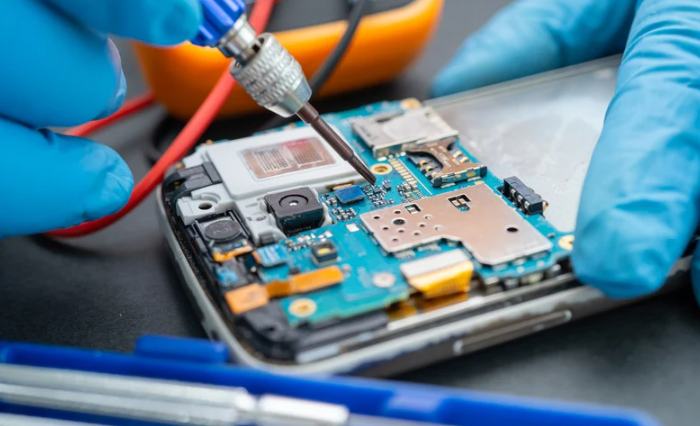
Modern tablets are engineered as highly compact systems where nearly every internal part is physically and electronically connected. Displays are bonded to frames, batteries are sealed into housings, and processors are integrated directly onto logic boards. This design reduces thickness and weight while improving performance efficiency. However, it also means that damage to one area can easily affect multiple components. Internal layouts prioritize space optimization rather than accessibility, making structural stability dependent on precise internal alignment.
Component integration plays a central role in tablet reliability. The display assembly often includes the glass, digitizer, touch sensors, and display panel as one bonded unit. Beneath this layer sit the logic board, connectors, antennas, speakers, cameras, and battery systems. These parts are arranged in stacked layers rather than separated compartments. As a result, pressure, heat, or impact in one section can transfer stress across the entire internal structure.
This architecture improves performance but increases vulnerability. Minor frame bending can distort internal connections. Heat buildup from processors can affect battery health. Liquid exposure can spread through multiple circuits instead of remaining localized. Tablets are designed for efficiency, not resilience, which makes them sensitive to environmental and mechanical stress. Even small drops can misalign connectors or crack internal solder points that are not visible externally.
Repair complexity increases with this integration. Fixing a single issue often requires partial disassembly of multiple systems. Professional repairs depend on detailed knowledge of internal layouts, proper disconnection sequencing, and safe handling of delicate components. Without precise techniques, repairs can create secondary damage that leads to new failures. Understanding tablet structure helps explain why professional repair standards focus on careful diagnostics and controlled disassembly rather than quick surface fixes.
Touchscreen Technology and Sensor Vulnerabilities
Tablet touchscreens are layered systems designed for sensitivity, clarity, and responsiveness. The surface glass provides protection, while the digitizer layer registers touch input through electrical conductivity. Beneath this sits the display panel, which produces the visual output. These layers are bonded together with adhesives that create a single unified screen structure. This design improves visual quality but reduces repair flexibility.
Touch sensors rely on precise electrical pathways that can be disrupted by physical damage, moisture, or internal pressure. Cracks in the glass do not always indicate deeper damage, but they often expose the digitizer layer to contaminants. Even small fractures can interfere with touch responsiveness, causing ghost touches, dead zones, or delayed input. Over time, repeated pressure and thermal expansion can weaken sensor connections even without visible damage.
Environmental exposure plays a major role in sensor vulnerability. Heat can degrade adhesives that bond screen layers. Moisture can create corrosion within conductive pathways. Dust particles can interfere with sensor accuracy. These factors gradually reduce performance, leading to inconsistent touch response and reduced screen sensitivity. Sensor issues are often misdiagnosed as software problems when they are actually hardware-related.
Professional touchscreen repair requires more than glass replacement. It involves assessing digitizer function, display output quality, and sensor calibration. Reassembly must restore proper pressure distribution and alignment to prevent long-term performance issues. Without correct bonding techniques and component handling, repaired screens may suffer from reduced sensitivity or early failure. Touchscreen systems are among the most delicate and technically demanding parts of tablet repair, making precision and expertise essential for lasting results.
Battery Systems in Tablets and Power Management
Tablet batteries are designed to balance energy density, safety, and long-term stability within extremely limited internal space. Most modern tablets use lithium-ion or lithium-polymer batteries, which provide high power output while maintaining a lightweight form. These batteries are chemically sensitive systems that rely on controlled charging cycles, temperature regulation, and internal protection circuits. Power management software and hardware work together to regulate voltage flow, charging speed, and energy distribution across the device.
Battery performance naturally declines over time due to chemical aging. Each charge cycle slightly reduces capacity, gradually shortening usage time between charges. Heat accelerates this process, making prolonged high-temperature exposure one of the most damaging factors for battery longevity. Internal resistance increases as batteries age, which leads to faster drain, inconsistent power delivery, and unexpected shutdowns. These changes often appear as performance issues before complete battery failure occurs.
Power management systems are designed to protect battery health, but they are not immune to degradation. Voltage regulators, thermal sensors, and charging controllers all play roles in maintaining safe operation. When any of these components fail or become inaccurate, battery stress increases. Overcharging, uneven power distribution, and thermal imbalance can occur, placing strain on internal components beyond the battery itself.
Professional battery repair involves more than replacing the power cell. It includes evaluating charging circuits, heat regulation systems, and internal connectors. Proper installation ensures correct pressure placement, electrical alignment, and thermal insulation. Poor battery replacement practices can lead to swelling, overheating, or unstable power flow. Long-term reliability depends on restoring both the physical battery and the supporting power management systems that regulate its function.
Charging System Failures in Tablets
Tablet charging systems consist of multiple integrated components that must work in precise coordination. The charging port, internal connectors, power management chip, and battery interface form a continuous electrical pathway. Any disruption in this chain can prevent proper charging. These systems are designed for efficiency and compactness, but their delicate structure makes them vulnerable to wear and environmental exposure.
Charging ports are among the most stressed components in any tablet. Repeated cable insertion, improper plug angles, and dust accumulation cause gradual mechanical wear. Internal connectors can loosen or crack, leading to intermittent charging or complete power failure. Moisture exposure accelerates corrosion, further degrading electrical contact points. These failures often begin subtly, showing inconsistent charging behavior before total system breakdown.
Power regulation chips and internal charging circuits add another layer of complexity. These components control voltage flow, charging speed, and thermal safety. When they malfunction, devices may overheat, fail to charge properly, or shut down during charging cycles. Charging failures are frequently misattributed to batteries when the true cause lies in internal circuitry.
Effective repair requires comprehensive diagnostics rather than surface-level fixes. Replacing a charging port without testing internal power pathways can leave underlying issues unresolved. Professional repair standards emphasize full system evaluation, component-level testing, and precise micro-soldering when necessary. Restoring proper charging function means rebuilding the entire electrical pathway, not just replacing visible hardware. Long-term stability depends on addressing both mechanical and electronic aspects of the charging system.
Tablet Software Ecosystems and System Errors
Tablet software ecosystems are complex environments where operating systems, firmware, applications, and background services interact continuously. These layers work together to manage hardware communication, security protocols, performance optimization, and user experience. Unlike traditional computers, tablets rely on tightly controlled software environments that are deeply integrated with their hardware. This structure improves efficiency but also increases system sensitivity to errors and conflicts.
System errors often develop gradually rather than appearing suddenly. Corrupted files, failed updates, incompatible applications, and memory overload can create instability within the operating system. Symptoms may include freezing, app crashes, boot loops, delayed response times, and system shutdowns. Over time, fragmented storage and background processes consume resources, reducing overall performance and responsiveness.
Firmware plays a critical role in maintaining stability. It controls communication between hardware components and the operating system. When firmware becomes outdated or corrupted, hardware functions may fail even when components are physically intact. Touch sensors, cameras, charging systems, and battery management can all be affected by firmware-level errors. These issues are frequently misdiagnosed as hardware failures.
Professional repair involves software diagnostics alongside physical inspection. System resets, firmware restoration, data integrity checks, and controlled updates are often required to restore stability. Effective repair strategies treat software as part of the device’s core infrastructure rather than a separate layer. Long-term performance depends on maintaining a healthy digital ecosystem that supports hardware function rather than undermines it.
Impact Damage and Structural Integrity Loss
Impact damage is one of the most common causes of tablet failure, yet its effects often extend far beyond visible cracks or dents. Tablets rely on precise internal alignment to maintain electrical connectivity and structural stability. Even minor drops can shift internal components, strain connectors, and weaken solder joints. These internal disruptions may not be immediately noticeable but can cause delayed failures over time.
Structural integrity loss affects both external and internal stability. Bent frames place pressure on display assemblies and logic boards. Microfractures in internal solder connections disrupt electrical pathways. Adhesive layers that secure components can weaken, allowing internal movement that increases wear. These changes gradually reduce device reliability and increase the risk of cascading system failures.
Repeated impact exposure compounds damage. Each drop increases internal stress, even if no visible damage appears. Over time, connectors loosen, circuits degrade, and component alignment deteriorates. This leads to unpredictable behavior such as random shutdowns, display flickering, charging failures, and touch response issues. Structural damage often presents as multiple unrelated symptoms that stem from a single physical cause.
Professional assessment focuses on structural diagnostics, not just cosmetic damage. Frame alignment, connector stability, internal mounting points, and pressure distribution are evaluated during repair. Restoring integrity requires careful reassembly, component stabilization, and proper reinforcement techniques. Long-term durability depends on reestablishing internal balance and structural support rather than simply replacing broken parts.
Performance Degradation Over Time
Tablet performance naturally declines as devices age, influenced by hardware wear, software evolution, and usage patterns. Processors, memory modules, storage drives, and batteries all experience gradual efficiency loss. Over time, operating systems become more demanding, applications require higher processing power, and storage management becomes more critical. These factors collectively reduce speed, responsiveness, and multitasking capability, even when physical damage is minimal. Users often notice slower app launches, lag during navigation, and delayed responses in touch functionality.
Hardware aging contributes significantly to performance reduction. Processors may throttle under sustained load due to thermal stress or degradation in electrical pathways. Memory modules can become fragmented or partially defective, slowing data access. Batteries lose capacity, causing voltage fluctuations that trigger safety mechanisms and reduce processing efficiency. Even well-maintained tablets experience these slow declines, which are often exacerbated by heavy daily use and exposure to high temperatures.
Software evolution also impacts performance. Operating system updates, security patches, and application upgrades demand more resources than earlier versions. Older hardware may struggle to meet these requirements, leading to slow response, occasional crashes, or reduced feature functionality. Firmware updates and driver mismatches can further affect compatibility, resulting in suboptimal performance even if the device appears physically sound.
Professional maintenance can mitigate long-term performance loss. Diagnosing bottlenecks, replacing worn batteries, optimizing storage, and updating firmware help restore operational efficiency. Regular monitoring of system health identifies early signs of degradation before they escalate. Effective care extends usability, allowing tablets to remain reliable and responsive over their intended lifespan. Understanding the interplay of hardware, software, and usage is essential to maintain optimal performance.
Data Security Risks During Repairs
Tablet repairs often involve access to sensitive personal data, making security a critical consideration. Devices contain login credentials, financial information, private documents, and other personal files that must be protected during maintenance. Understanding the potential risks ensures users take appropriate precautions before repair. Even minor repairs, such as screen or battery replacement, may require partial activation or internal access. Awareness of these risks highlights the importance of relying on professional services with robust security protocols.
- Risk of Data Loss: Disconnecting or reconnecting storage components can result in accidental deletion or corruption of critical files. Even routine repairs can inadvertently affect device firmware or system settings. Professional repair providers take precautions to safeguard data integrity throughout the process.
- Unauthorized Access: Mishandling devices in unverified repair environments may expose sensitive personal information. Unauthorized technicians could potentially access login credentials, financial apps, or private files. Trusted providers follow strict protocols to prevent such breaches, ensuring confidentiality at all times.
- Firmware and System Updates: Reinstalling operating systems or restoring firmware carries inherent risks of erasing stored data. Backups are essential to prevent permanent loss during these procedures. Professional technicians verify backups and manage updates carefully to maintain continuity and functionality.
- Professional Protocols: Expert repair services power down devices before disassembly and follow systematic handling procedures. Storage components are managed with care, and diagnostic testing avoids unnecessary access to personal information. Encryption, backup verification, and secure workflows are standard practices to mitigate risks.
- Urban Considerations: High-demand repair areas, such as Bronx, NY, present additional privacy concerns due to volume and device diversity. Professional repair providers combine technical expertise with strict security measures to protect sensitive information. Customers benefit from restored device functionality while maintaining peace of mind about privacy.
Ensuring data security during repairs is as important as restoring device functionality. Professional repair practices protect both personal information and hardware integrity. Users should back up important files before any service. Trusted providers follow rigorous protocols to minimize exposure to risk. Combining expertise with secure handling preserves both device reliability and user confidence.
Repair vs Replacement in the Tablet Market
Choosing between repair and replacement is a common consideration for tablet owners facing damage or performance decline. Decisions are influenced by cost, device age, functionality, and long-term usability. Repair can restore device performance and extend lifespan at a fraction of replacement cost, while replacement provides the latest features but incurs higher expense. Understanding the trade-offs between these options allows users to make informed choices based on both financial and practical considerations.
Tablet repairs are often more cost-effective than full replacement. Minor issues such as screen cracks, battery degradation, charging port wear, or software instability can be corrected without purchasing a new device. Professional repair restores core functionality while retaining personal data and installed applications. The process is faster than migrating to a new device, reducing downtime for users who rely on tablets for daily tasks. Repairs also reduce electronic waste, making them a sustainable choice in the broader consumer electronics market.
Replacement becomes more relevant in cases of extensive damage or outdated hardware. Devices that have multiple failed components, outdated processors, or unsupported operating systems may not justify the cost of repair. New tablets offer enhanced performance, security updates, and additional features that older models cannot support. Users must weigh the immediate financial outlay against potential long-term benefits of a modern device with extended warranty coverage and updated software ecosystems.
The decision often involves evaluating overall device value and intended use. Repairs preserve familiarity, existing apps, and data continuity, while replacements offer technological advancement. Trusted service providers, such as those offering tablet repair Bronx, NY, guide consumers through this decision by providing transparent diagnostics and cost estimates. Ultimately, the choice depends on balancing cost, convenience, and long-term usability while ensuring device reliability and security.
Professional Repair Standards for Tablets
Professional tablet repair requires a combination of technical expertise, precise tools, and standardized procedures to ensure reliable outcomes. Technicians must understand internal component layouts, electrical pathways, thermal management, and software integration. Each repair step, from disassembly to reassembly, follows established protocols to prevent secondary damage and maintain device integrity. High-quality parts, calibrated tools, and controlled environments are essential to restore devices safely and efficiently.
Repairs follow a structured diagnostic process to identify the root cause of failure. Technicians evaluate hardware components, including displays, touch sensors, batteries, and connectors, alongside software systems. Comprehensive testing ensures that all underlying issues are detected before any replacement or repair work begins. This approach prevents unnecessary component replacements and ensures that repairs address both visible and hidden problems.
Component replacement requires careful handling and alignment. Screens, batteries, and charging ports are often tightly integrated, demanding precision during removal and installation. Misalignment or improper connection can compromise functionality, cause overheating, or trigger system errors. Professional standards dictate correct torque, adhesive application, and electrical alignment to maintain long-term reliability. Each step is documented and quality-checked to prevent early failure.
Post-repair testing is critical to ensure operational stability. Tablets undergo performance assessment, touch sensitivity calibration, battery efficiency checks, and software verification. Any residual issues are addressed before returning the device to the user. Adherence to these professional standards ensures that repaired tablets function reliably, maintaining both safety and performance over time. Users benefit from repairs that extend device life while safeguarding data and usability.
Long-Term Tablet Reliability Planning
Ensuring long-term tablet reliability requires a combination of proper usage, regular maintenance, and timely professional intervention. Users can extend the lifespan of their devices by adopting careful handling practices, such as using protective cases, avoiding excessive drops or pressure, and keeping devices away from extreme temperatures. Regularly updating software and performing system maintenance helps prevent performance degradation and ensures security. Attention to charging habits, including avoiding overcharging and using recommended cables, also supports battery longevity and overall device stability.
Preventive care is complemented by professional repair when issues arise. Trusted repair services address both visible and hidden problems, restoring functionality while maintaining structural integrity. From replacing worn batteries to fixing touchscreen responsiveness or charging issues, professional repairs mitigate risks associated with continued use of compromised components. This approach reduces the likelihood of cascading failures, which can be costly and inconvenient if left unaddressed.
Planning for long-term reliability also involves informed decision-making regarding device upgrades or replacements. Assessing the cost-benefit of repair versus replacement helps users maintain efficiency without unnecessary expense. Devices repaired by certified technicians often achieve performance levels comparable to new units, particularly when repairs follow industry standards and use high-quality components.
Ultimately, combining careful daily use with proactive maintenance and professional repair ensures that tablets remain dependable tools over time. Users benefit from consistent performance, extended lifespan, and reduced risk of data loss or hardware failure. This holistic approach to device management maximizes both convenience and value, making tablets reliable companions for work, learning, and personal use well into the future.