

Problem:
You want to track your trading performance, but screenshots and spreadsheets feel unreliable.
Agitation:
Manual tracking hides drawdown, distorts results, and raises trust issues if you share performance publicly.
Solution:
Connecting your trading account to Myfxbook gives you verified, real-time analytics using read-only access. This guide shows how to do it correctly, avoid common mistakes, and keep your data updating without risk.
read more from: https://www.sarowarjahan.com/connect-mt4-investor-password-myfxbook/
What Is Myfxbook and Why Traders Connect Their Accounts
Myfxbook is an analytics platform that connects directly to your trading account.
It tracks trades, equity, drawdown, and risk in real time.
Traders connect accounts to:
- Monitor performance objectively
- Verify trading results
- Share track records with investors or communities
Unlike spreadsheets, Myfxbook pulls data directly from MT4 or MT5.
What You Need Before Connecting a Trading Account to Myfxbook
Before you start, prepare the basics. This prevents 90% of failed connections.
Supported Platforms and Broker Requirements
Myfxbook supports:
- MetaTrader 4 (MT4)
- MetaTrader 5 (MT5)
Your broker must allow investor (read-only) access.
Most regulated brokers do.
Investor Password vs Master Password (Critical Difference)
This matters.
- Master password: Full control. Never share it.
- Investor password: Read-only access. Safe for tracking.
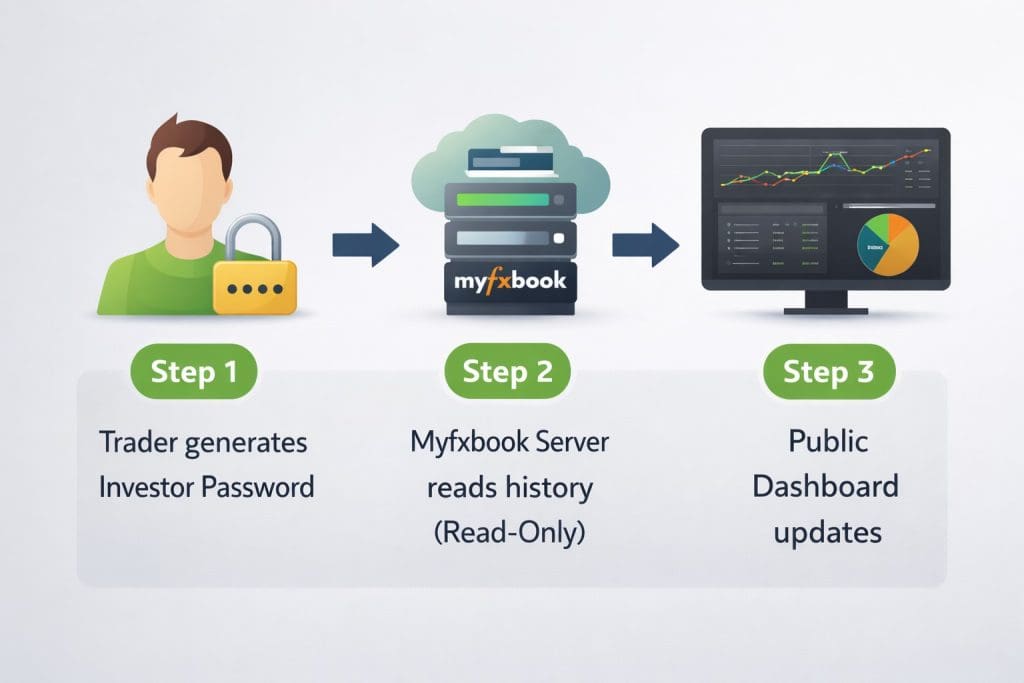
Myfxbook only needs the investor password.
How to Connect Your Trading Account to Myfxbook (Step-by-Step)
This is the most reliable method for most traders.
- Log in to your Myfxbook account
- Click Portfolio → Add Account
- Choose Auto Update
- Select MT4 or MT5
- Enter:
- Account number
- Broker server
- Investor password
- Save and wait for verification
If details are correct, Myfxbook syncs automatically.
How to Connect MT4 and MT5 Accounts to Myfxbook
The steps are similar, but small differences matter.
Connecting an MT4 Account
- Use the exact broker server name
- MT4 servers are usually stable
- Fewer update issues overall
Connecting an MT5 Account
- MT5 often has multiple server variants
- Wrong server name causes sync failure
- Double-check the server inside your platform
MT5 issues are usually server-related, not password-related.
Auto Update vs Manual Update: Which Method Should You Use?
Most traders should use Auto Update, but manual still has a place.
| Feature | Auto Update | Manual Update |
|---|---|---|
| Update frequency | Real-time | Manual upload |
| Setup effort | Medium | Low |
| Reliability | High | Medium |
| Best for | Active traders | Offline accounts |
Auto Update (Recommended)
- No manual uploads
- Continuous performance tracking
- Best for public verification
Manual Update (Limited Use)
- Upload statements manually
- Delays in data
- Not ideal for transparency
Why Myfxbook Is Not Updating Trades (And How to Fix It)
If syncing stops, check these first.
Common Causes
- Investor password changed
- Broker server renamed
- Auto update disabled
- Platform downtime
How to Fix It
- Reconnect the account
- Verify server name
- Re-enter investor password
Publisher EA (Last Resort)
The Publisher EA runs on your platform and pushes data manually.
Use it only if auto update fails repeatedly.
Is It Safe to Connect Your Trading Account to Myfxbook?
Yes, when done correctly.
Myfxbook uses read-only investor access.
It cannot:
- Place trades
- Close positions
- Withdraw funds
Your capital stays under your control.
Security depends on never sharing the master password.
How Traders Use Myfxbook After Connecting Their Accounts
Once connected, traders use Myfxbook to:
Verify and Share Performance
- Public or private account links
- Trusted performance history
Analyze Risk and Drawdown
- Equity vs balance analysis
- Risk exposure tracking
Improve Trading Strategy
- Identify losing patterns
- Compare win rate vs risk
Many professional traders showcase verified results on personal sites like https://www.sarowarjahan.com/ to build credibility and trust.
FAQ: Connecting Trading Accounts to Myfxbook
How do I connect my trading account to Myfxbook?
Bold Answer (30 words):
Log in to Myfxbook, add a new account, select Auto Update, choose MT4 or MT5, and enter your investor password to sync trading data securely.
The process takes only a few minutes if credentials are correct.
Is it safe to connect my trading account to Myfxbook?
Bold Answer (30 words):
Yes, Myfxbook uses read-only investor access, meaning it can view trades but cannot place, close, or manage positions or funds.
Security depends on using the correct password type.
Why is Myfxbook not updating my trades?
Bold Answer (30 words):
Updates fail due to wrong server details, changed investor passwords, disabled auto update, or broker-side issues. Reconnecting usually fixes the problem.
MT5 server mismatches are common.
What is an investor password in Myfxbook?
Bold Answer (30 words):
An investor password provides read-only access to your trading account, allowing Myfxbook to track performance without granting trade or withdrawal control.
It is safe for analytics only.
Can I connect both MT4 and MT5 accounts to Myfxbook?
Bold Answer (30 words):
Yes, Myfxbook supports both MT4 and MT5 accounts, but each account must be added separately with the correct platform and server details.
Mixed portfolios are supported.
Final Note
Connecting your trading account to Myfxbook is not about automation.
It’s about accuracy, transparency, and trust.
Set it up once, verify it properly, and let the data speak.
