

In today’s workplace, strong presentation skills are a must. But creating slides can be time-consuming, tricky to design, and hard to make look polished. These problems can slow you down and affect the impact of your reports or client proposals.
That’s where AI presentation makers come in. WorkPPT makes creating professional slides simple and effortless. With its smart, easy-to-use, all-in-one features, it helps you turn ideas into polished presentations in no time.

What is WorkPPT AI Presentation Maker
WorkPPT AI Presentation Maker is an online presentation tool powered by artificial intelligence. It keeps all the features of traditional PPT but adds AI to automatically improve your design, text, and media, making presentation creation much easier and faster.
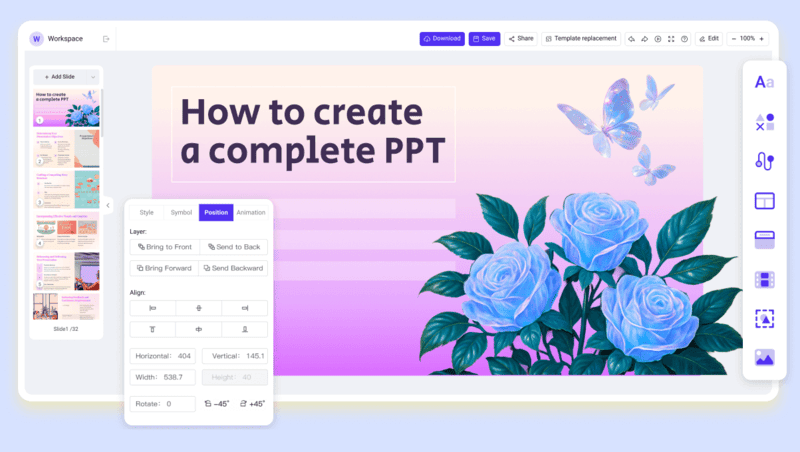
Compared to traditional tools like PowerPoint, WorkPPT stands out by:
- Saving Time: Cuts down on repetitive work so you can focus on the content.
- Looking Professionalism: Automatically adjusts layouts, color, and structure for polished slides.
- Flexible Use: Quickly makes presentation for any situation—work reports, sales pitches, or training materials.
As a free AI presentation maker, WorkPPT makes it easy for anyone to create professional-looking PowerPoints without stress.
A Closer Look at WorkPPT AI Presentation Maker
Here’s a clear overview of WorkPPT best AI presentation generator‘s main features and how to get the most out of them.
1. Smart Templates and Design
WorkPPT comes with hundreds of professional templates for different industries and uses, like business reports, sales pitches, and training sessions.
Just type in your topic, and the AI will pick the right layout and color scheme for you. It keeps your slides clean, consistent, and professional. So you can make great presentation fast, without wasting time on design.
2. Intelligent Text and Data Processing
WorkPPT helps you refine your text so it’s clear, concise, and well-organized.
It also lets you create all kinds of charts, like bar, line, pie, and funnel. Simply import your data, and AI will instandly generate professional charts that fit your slide’s theme, making your data visualization both intuitive and visually appealing.
3. Animation and Multimedia Integration
AI intelligently suggests animation effects based on content to make slides more engaging while avoiding excessive flashiness.
You can also easily add videos, images, or audio in different formats to make your presentation more dynamic and impactful.
4. AI PDF, AI Mind Map
WorkPPT combines PDF merging and splitting, document extraction, and smart mind mapping in one platform. You can not only create stunning slides but also manage PDFs and other files easily, making it a true all-in-one office solution.
5. AI Chat
With AI chat capabilities, you can quickly refine content, adjust phrasing, and boost productivity, ensuring every presentation is more precise and professional.
Workplace Applications for WorkPPT
1. Work Reports
Creating daily reports usually takes time and effort. With WorkPPT, just enter your text and data, the AI instantly turns them into professional slides. It automatically polishes charts and layouts, saving you hours of manual work. Whether you’re sharing financial results or project updates, you can finish your slides in minutes and focus more on analysis and decisions.
2. Sales and Client Proposals
Creating sales proposals means presenting your ideas clearly while keeping your brand consistent and visually appealing. WorkPPT automatically builds templates using your brand colors and style, and even suggests animations and multimedia. The result? A polished, persuasive proposal, without endless team edits.
3. Training and Internal Sharing
Training materials often include lots of text, charts, and diagrams. With WorkPPT, you can quickly turn this content into clear, animated presentations. It also lets you export your slides to PDF, PPTX, or Google Slides, making it easy to share both online and offline.
How to Create a Presentation with WorkPPT
You can create a professional presentation in minutes using WorkPPT, and follow the detailed steps.
Step 1: Open your browser and visit workppt.com. Sign up or enter the editor directly as a guest.
Step 2: Type your topic into the input box, for example: “Generate a perfect presentation in education”. Click “Generate Slides”, and WorkPPT will automatically draft content and layout.
Step 3: The system will recommend several visual styles. Preview and select your preferred layout.
Step 4: Wait 5 seconds to see the complete presentation structure, including title page, table of contents, chapter pages, summary page, and chart pages.
Step 5: To adjust content, simply click text areas or images for editing. WorkPPT offers a “Regenerate Specific Page” feature, enabling partial tweaks while maintaining overall consistency.
Step 6: Upon completion, directly download the file or generate a viewable link for presentation.
Conclusion
In the workplace, great presentations make your work faster and your team communication smoother. WorkPPT AI Presentation Maker achieves its goal of being the ultimate workplace PPT assistant through intelligent templates, text optimization, data visualization, and multimedia integration. Try WorkPPT now to make every report, proposal, and training session efficient and outstanding!