

If you’ve ever spent hours sorting through handwritten timesheets, correcting buddy-punching incidents, or reconciling payroll discrepancies, you know the frustration of manual attendance tracking. For small business owners, these inefficiencies don’t just waste time—they drain resources and create compliance risks that can snowball as your team grows. The good news is that an online time punch clock offers a smarter path forward. By moving attendance management to the cloud, businesses gain access to accurate records, real-time visibility, and the kind of flexible scheduling that today’s workforce demands. Whether you manage a retail team with rotating shifts or a hybrid office with remote employees, a cloud-based system adapts to your operations rather than forcing you into rigid processes. In this article, we’ll explore how these modern tools eliminate common pain points, the features that matter most, and practical steps to implement a system that scales with your business.
The Challenges of Manual Attendance Tracking for Small Businesses
Manual attendance tracking might seem manageable when you have a handful of employees, but cracks appear quickly as your team expands. Time theft—whether through buddy punching, extended breaks, or inflated hours—costs U.S. businesses billions annually, and small operations feel the impact disproportionately. Every unrecorded late arrival or early departure chips away at your bottom line. Beyond theft, handwritten timesheets and spreadsheet-based systems are breeding grounds for payroll errors. A misread entry or transposed number can mean overpaying one employee while shortchanging another, eroding trust and triggering disputes. Then there’s the visibility problem: without real-time data, managers operate blind. You can’t adjust staffing levels for a busy Friday afternoon if you don’t know who’s actually on the floor until the week’s timesheets land on your desk.
The administrative burden compounds everything. Hours spent cross-referencing punch cards, chasing down missing entries, and manually calculating overtime are hours not spent on revenue-generating activities. For growing businesses that need agile workforce management, these outdated methods create a ceiling—one that limits your ability to offer flexible schedules, respond to demand shifts, or maintain the compliance documentation that labor audits require.
What is a Cloud-Based Time Punch Clock?
A cloud-based time punch clock is a digital attendance system that allows employees to clock in and out through internet-connected devices—smartphones, tablets, computers, or dedicated kiosks—while storing all data securely on remote servers. Unlike traditional punch card machines or locally installed software, this approach eliminates the need for on-site hardware maintenance and gives authorized users access to attendance records from anywhere with an internet connection. The cloud infrastructure ensures automatic backups, real-time data synchronization across locations, and enterprise-grade security without requiring an in-house IT team. For small business owners, this means you can monitor who’s working, where they’re working, and when they started or finished—all from your phone during a lunch meeting or from home after hours. The system serves as a central hub where scheduling, time tracking, and reporting converge, replacing fragmented tools with one streamlined platform.
Key Components of a Smart Attendance System
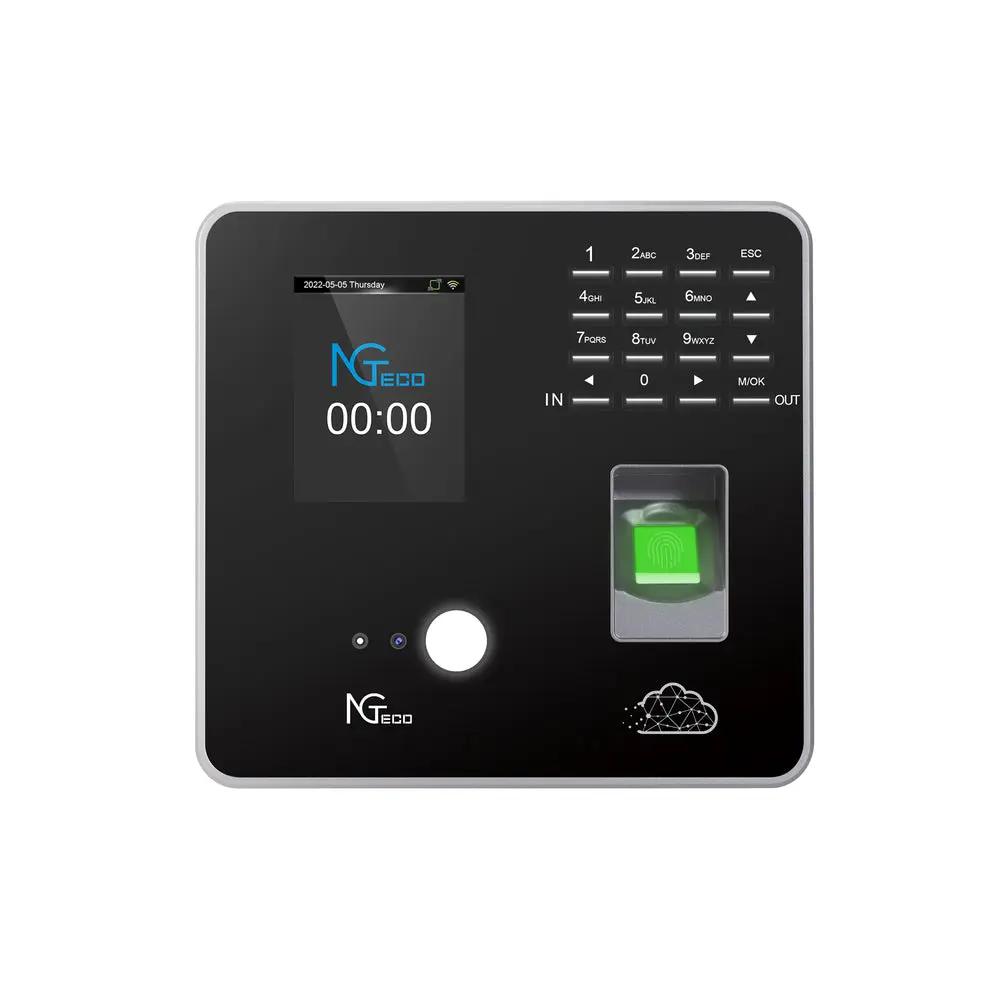
Modern cloud-based time clocks typically include a mobile app that lets employees punch in using GPS-verified locations, ensuring remote or field workers log hours honestly without needing to visit a physical terminal. Biometric integration—fingerprint scans, facial recognition, or voice verification—eliminates buddy punching by tying each clock event to a unique individual. Hardware providers like NGteco offer biometric terminals that pair with cloud platforms, combining physical access control with digital time tracking in a single device. On the management side, dashboard analytics present real-time attendance data through visual summaries: who’s currently on shift, who’s approaching overtime, and which departments are understaffed. These components work together to deliver real-time attendance tracking that managers can act on immediately rather than discovering problems days later during payroll processing.
Benefits of Adopting an Online Time Punch Clock
Switching to an online time punch clock delivers immediate, measurable improvements that directly address the frustrations small business owners face daily. The most obvious advantage is accuracy—automated time capture eliminates the rounding errors, forgotten punches, and deliberate manipulation that plague manual systems. When every clock event is digitally recorded with timestamps and verification, payroll calculations become precise, reducing costly overpayments and the uncomfortable conversations that follow underpayments. Cost savings extend beyond payroll accuracy. By curbing time theft and reducing the administrative hours spent on manual reconciliation, businesses often recoup their investment within months. Staff previously buried in timesheet corrections can redirect their energy toward strategic tasks that actually grow the business. Compliance becomes less daunting as well. Labor laws around overtime, break requirements, and record retention vary by state and industry, and a cloud-based system automatically maintains the documentation needed to satisfy audits. Digital records are timestamped, tamper-evident, and retrievable in seconds—a stark contrast to digging through filing cabinets of paper timesheets. Perhaps most importantly for today’s workforce expectations, these systems create the infrastructure needed for flexible scheduling, remote work arrangements, and multi-location management without sacrificing oversight or accountability.
Ensuring Accurate Attendance Records
Cloud-based time clocks eliminate human error at every stage of the attendance lifecycle. Employees can’t accidentally write “9:00” when they arrived at “9:15” because the system captures exact timestamps automatically. Every modification—whether an employee-requested edit or a manager’s adjustment—generates an audit trail showing who changed what and when. Automated reporting means payroll data flows directly from the time clock to your processing system without manual re-entry, removing the transcription errors that cause paycheque discrepancies. For small businesses where one payroll mistake can damage employee trust, this reliability is transformative. The data also supports pattern recognition, helping you identify chronic tardiness or absenteeism before it becomes a larger performance issue.
Enabling Flexible Scheduling Options
Flexible scheduling becomes practical rather than chaotic when supported by the right technology. Cloud-based systems let managers build, publish, and modify shift schedules from any device, with changes instantly visible to affected employees through push notifications. Remote clock-ins allow hybrid and field-based workers to log hours from client sites, home offices, or job locations without returning to a central terminal. Employees can swap shifts through the platform with manager approval, reducing the back-and-forth texts and calls that consume everyone’s time. Adjustable schedule templates accommodate seasonal demand fluctuations, split shifts, and compressed workweeks—giving your team the work-life balance they value while ensuring you always have adequate coverage where it matters most.
Implementing a Smart Attendance System: Step-by-Step Solutions
Transitioning from manual tracking to a cloud-based time punch clock doesn’t require a massive IT overhaul or weeks of downtime. With a structured approach, most small businesses can be fully operational within days. The key is treating implementation as a phased process rather than a single event, ensuring each stage builds on the last and that your team feels confident rather than overwhelmed by the change.
Step 1: Assess Your Business Needs and Goals
Start by auditing your current attendance workflow. Document where errors occur most frequently, how much time managers spend on scheduling tasks, and what flexibility your employees actually need. A restaurant with rotating shifts has different requirements than a consulting firm with remote workers. Identify your non-negotiables—GPS verification, overtime alerts, multi-location support—so you can evaluate solutions against concrete criteria rather than feature lists that may not apply to your situation.
Step 2: Choose the Right Cloud-Based Time Punch Clock
Evaluate platforms based on real-time attendance tracking capabilities, ease of use for non-technical staff, and scalability as your headcount grows. Prioritize systems offering mobile clock-in options, integration with your existing payroll software, and responsive customer support. Request free trials to test the interface with a small group before committing, and confirm that the platform handles your specific scheduling complexity—whether that’s split shifts, on-call rotations, or cross-department coverage.
Step 3: Set Up and Train Your Team
Configure the system with your pay rules, break policies, and overtime thresholds before rolling it out. Then conduct brief hands-on training sessions—fifteen minutes is usually sufficient for employees to learn clock-in procedures. Designate a point person for questions during the first two weeks, and update your attendance policy documentation to reflect the new process and expectations.
Step 4: Monitor, Optimize, and Scale
Review attendance reports weekly during the first month to catch configuration issues and identify patterns. Use the data to refine schedules, redistribute shifts based on actual demand, and address compliance gaps. Once the system runs smoothly at one location or department, expand it across your entire operation, leveraging the flexible scheduling tools to accommodate growth without adding administrative complexity.
Essential Features to Look for in a Modern Time Punch Clock
Not all cloud-based time clocks deliver equal value, so knowing which features directly impact your daily operations helps you invest wisely. Real-time attendance updates should be non-negotiable—you need instant visibility into who’s clocked in, who’s running late, and where staffing gaps exist so you can make same-day adjustments rather than reactive corrections after the fact. Cloud-based access means managers aren’t tethered to a desktop; whether you’re visiting a second location, traveling for business, or working from home, full scheduling and reporting capabilities should be available through any browser or mobile device. For flexible scheduling specifically, look for drag-and-drop shift builders, automated conflict detection that flags double-bookings or rest-period violations, and employee self-service portals where staff can view upcoming shifts, request time off, and pick up open slots without manager intervention for every minor change. Geofencing and GPS verification matter if you employ mobile or remote workers, ensuring clock-ins only register within approved locations. Finally, seamless payroll integration eliminates the export-import dance between systems, pushing verified hours directly into your processing software and closing the loop between time tracked and wages paid.
Real-World Success: Small Businesses Thriving with Cloud-Based Solutions
A regional cleaning company with 45 employees across three cities struggled with field workers inflating hours and managers spending entire Fridays reconciling timesheets. After implementing a cloud-based time punch clock with GPS verification, they reduced payroll discrepancies by 32% in the first quarter and reclaimed nearly ten administrative hours weekly. A family-owned café chain facing high turnover used flexible scheduling features to let staff swap shifts through a self-service portal, cutting no-shows in half and improving employee satisfaction scores. Meanwhile, a growing marketing agency with hybrid remote workers adopted real-time attendance tracking to maintain accountability without micromanaging—their project managers now allocate resources based on actual availability rather than guesswork. These businesses share a common thread: they replaced reactive, error-prone processes with proactive systems that scaled alongside their growth.
Transform Your Workforce Management with Cloud-Based Time Tracking
Manual attendance tracking creates problems that compound over time—payroll errors erode employee trust, time theft quietly drains profits, and rigid systems prevent you from offering the flexible schedules that attract and retain talent. A cloud-based time punch clock addresses each of these challenges through automated accuracy, real-time visibility, and scheduling tools that adapt to how modern teams actually work. The shift from paper timesheets to digital tracking isn’t just a technology upgrade; it’s a fundamental improvement in how you manage your workforce. Accurate records protect you during audits, real-time data empowers better staffing decisions, and flexible scheduling options keep your team engaged without sacrificing accountability. For small business owners ready to stop losing hours to administrative busywork and start building scalable operations, the path forward is clear. Evaluate your current pain points, explore cloud-based solutions that match your specific needs, and take the first step toward an attendance system that grows with you rather than holding you back.
