
Introduction
Cloud computing has completely transformed how businesses build, manage, and deliver digital services. Instead of relying on bulky on-premise hardware or expensive software installations, organizations now access computing power, platforms, and applications directly from the cloud.
But here’s where things get confusing — IaaS, PaaS, and SaaS. These three models are the backbone of modern cloud computing, yet many still mix them up. So, what do they really mean? How do they differ? And most importantly — which one should your business choose?
In this guide, we’ll break down everything you need to know about IaaS vs PaaS vs SaaS, with examples, comparisons, and tips to help you choose the right model for your needs.
👉 Published by OfferLooters.com, your go-to resource for the latest software insights, tech comparisons, and digital growth guides.
Understanding the Cloud Service Models
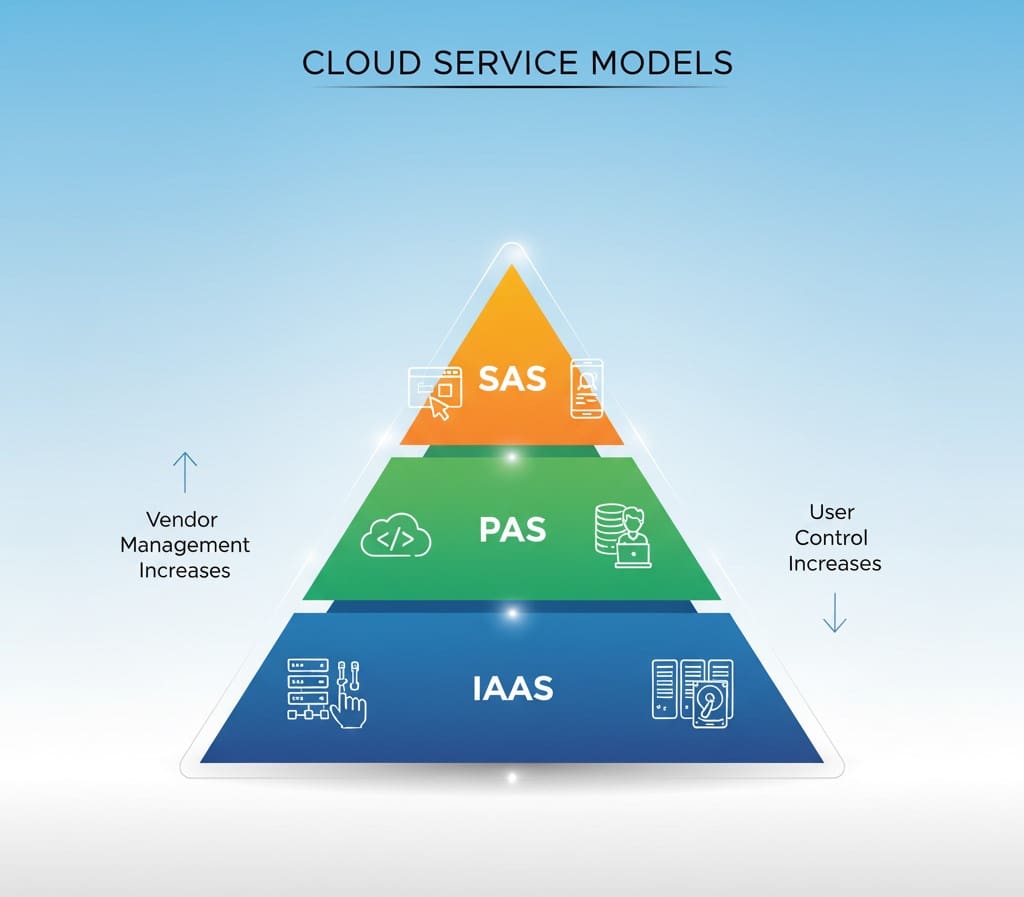
Before diving into the differences, it’s important to understand that IaaS, PaaS, and SaaS represent three layers of cloud computing.
Each layer determines how much control you retain and how much management your provider handles.
Visual Suggestion:
Graphic: A layered pyramid showing IaaS at the base, PaaS in the middle, and SaaS at the top — labeled with “Infrastructure,” “Platform,” and “Software.”
Alt text: Three-layer pyramid diagram of IaaS, PaaS, and SaaS hierarchy.
What Is IaaS (Infrastructure as a Service)?
IaaS provides the foundational infrastructure — servers, storage, networking, and virtualization — all hosted in the cloud. You rent these resources from a cloud provider and build your own IT environment on top.
Key Features of IaaS
- Virtual servers and computing power
- Scalable storage and bandwidth
- Pay-as-you-go pricing
- High flexibility and control
Examples of IaaS Providers
- Amazon Web Services (AWS EC2)
- Google Compute Engine (GCE)
- Microsoft Azure Virtual Machines
Best For
Developers, IT teams, and businesses needing full control over their environment without maintaining physical hardware.
Visual Suggestion:
Graphic: Illustration of cloud servers connected to users with labels like “Compute,” “Storage,” and “Network.”
Alt text: IaaS cloud infrastructure diagram showing virtual machines and networking.
What Is PaaS (Platform as a Service)?
PaaS sits on top of IaaS. It provides a ready-made platform with the tools, frameworks, and environments needed for application development — without worrying about managing servers or databases.
Key Features of PaaS
- Preconfigured development environments
- Built-in scalability and database integration
- Automated software updates
- Developer-friendly deployment tools
Examples of PaaS Providers
- Google App Engine
- AWS Elastic Beanstalk
- Heroku
- Microsoft Azure App Services
Best For
Software developers who want to build, test, and deploy applications quickly without handling infrastructure.
Visual Suggestion:
Graphic: Flowchart of app development lifecycle showing “Code → Build → Deploy → Scale” within a cloud platform.
Alt text: Application development cycle using Platform as a Service.
What Is SaaS (Software as a Service)?
SaaS is the top layer — complete software applications delivered over the internet. Users simply log in and start using the app, without installing or maintaining anything locally.
Key Features of SaaS
- Cloud-hosted and browser-accessible
- Subscription-based pricing
- Automatic updates and maintenance
- Access from any device
Examples of SaaS Providers
- Google Workspace (Docs, Gmail)
- Microsoft 365
- Salesforce
- Dropbox
- Slack
Best For
Businesses and individuals who want ready-to-use applications for productivity, collaboration, or customer management.
Visual Suggestion:
Graphic: Icons or mini-screens of popular SaaS apps (Salesforce, Google Workspace, Slack).
Alt text: SaaS cloud applications accessible from various devices.
Key Differences Between IaaS, PaaS, and SaaS
Let’s summarize what sets them apart.
| Feature | IaaS | PaaS | SaaS |
|---|---|---|---|
| Full Form | Infrastructure as a Service | Platform as a Service | Software as a Service |
| User Control | High (you manage everything above OS) | Moderate (you manage apps only) | Low (everything is managed for you) |
| Main Users | IT admins, DevOps, enterprises | Developers, startups | Businesses, end-users |
| Examples | AWS EC2, Azure VM | Google App Engine, Heroku | Microsoft 365, Dropbox |
| Cost Model | Pay for resources used | Pay per development platform | Subscription-based |
Visual Suggestion:
Graphic: A three-column infographic comparing control, cost, and users for IaaS, PaaS, SaaS.
Alt text: Comparison chart of IaaS, PaaS, and SaaS cloud models.
Choosing the Right Cloud Model for Your Business
When deciding between IaaS, PaaS, and SaaS, the choice depends on your goals, budget, and technical expertise.
- Choose IaaS if you need complete control and customization (ideal for IT teams and large enterprises).
- Choose PaaS if your focus is app development efficiency and faster time-to-market.
- Choose SaaS if you want ready-to-use tools with zero maintenance.
👉 Tip from OfferLooters.com: Many modern organizations use a hybrid model — combining IaaS for infrastructure, PaaS for development, and SaaS for daily operations.
Visual Suggestion:
Graphic: A “decision tree” visual helping readers choose IaaS, PaaS, or SaaS based on needs.
Alt text: Flowchart showing how to select a cloud service model.
Real-World Use Cases
| Industry | Common Use Case | Preferred Model |
|---|---|---|
| Startups | Rapid app deployment | PaaS |
| E-commerce | Scalable hosting and data storage | IaaS |
| Education | Online learning tools | SaaS |
| Enterprise IT | Virtualization and hybrid cloud setups | IaaS + PaaS |
| Remote Teams | Communication & productivity apps | SaaS |
Visual Suggestion:
Graphic: Infographic showing industries mapped to preferred cloud models.
Alt text: Cloud service models by industry and use case.
Challenges and Considerations
Each model has pros and cons. Here’s what to watch out for:
- IaaS: More complex setup and management responsibilities.
- PaaS: Limited control over underlying systems.
- SaaS: Potential data privacy and integration limitations.
Always evaluate security, scalability, and vendor reliability before choosing a provider.
Visual Suggestion:
Graphic: Pros vs. cons chart showing trade-offs for each model.
Alt text: Challenges of IaaS, PaaS, and SaaS explained visually.
The Future of Cloud Computing
Cloud technology is evolving fast. Expect to see AI integration, serverless architectures, and edge computing reshape how cloud services operate.
Companies adopting flexible cloud strategies today will gain a strong competitive advantage tomorrow.
Visual Suggestion:
Graphic: Futuristic cloud network illustration showing interconnected AI and IoT systems.
Alt text: Future trends in cloud computing with AI and edge integration.
Conclusion
Understanding the difference between IaaS, PaaS, and SaaS helps businesses make smarter IT decisions.
Each model offers unique benefits — from complete control with IaaS, to developer efficiency with PaaS, to hands-off convenience with SaaS.
By choosing the right model (or combination), you can reduce costs, improve agility, and future-proof your organization’s tech stack.
👉 For more detailed comparisons, tech insights, and growth resources, visit OfferLooters.com.
Frequently Asked Questions (FAQs)
1. What’s the main difference between IaaS, PaaS, and SaaS?
IaaS provides cloud infrastructure, PaaS offers a platform for development, and SaaS delivers complete software applications over the internet.
2. Which is better for startups — IaaS, PaaS, or SaaS?
Startups usually benefit from PaaS or SaaS, since they’re affordable, scalable, and require minimal technical management.
3. Can I use all three models together?
Yes! Many companies combine IaaS for infrastructure, PaaS for development, and SaaS for end-user applications to create a seamless cloud ecosystem.
4. Is SaaS more secure than IaaS or PaaS?
SaaS providers manage most security aspects, but the actual security depends on your provider’s compliance and data protection policies.
5. What are some popular examples of each model?
- IaaS: AWS EC2, Google Compute Engine
- PaaS: Heroku, Google App Engine
- SaaS: Salesforce, Microsoft 365, Dropbox
