
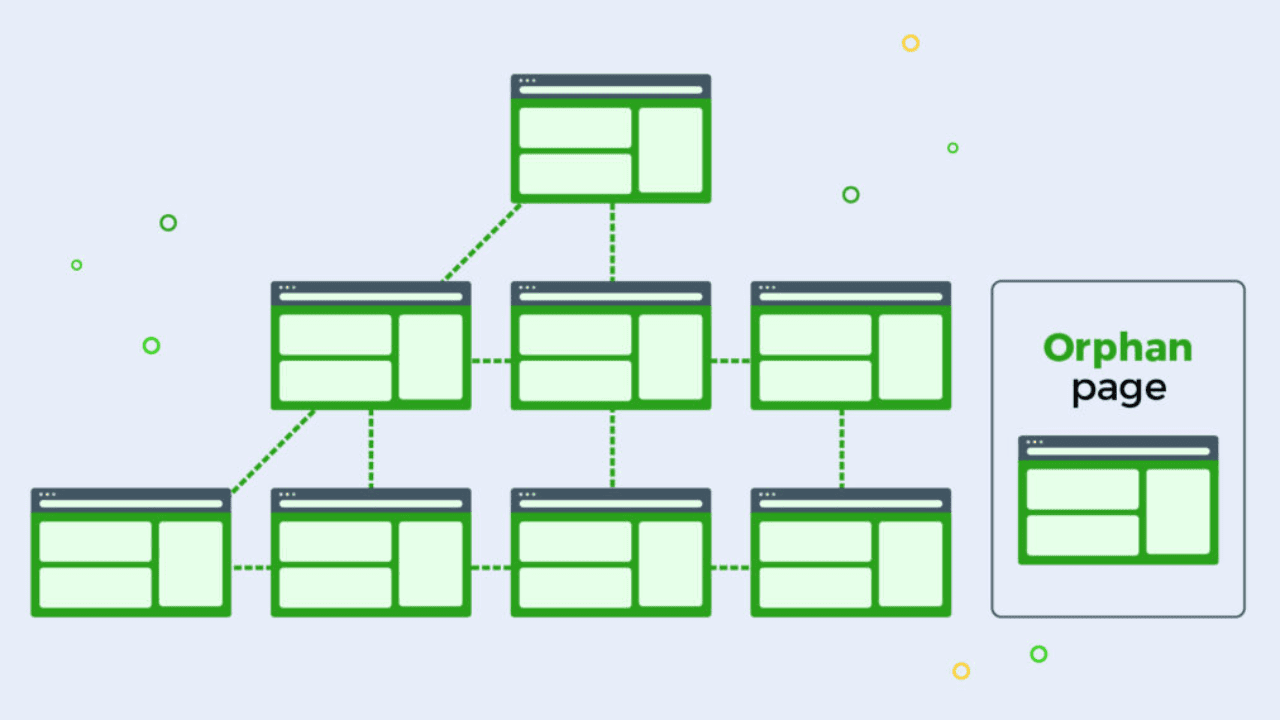
Orphan pages hurt your site’s SEO by staying invisible to search engines. These are pages with no internal links pointing to them, making them nearly impossible to find. Orphan Pages SEO issues block crawlability, indexing, and reduce organic traffic. In this guide, you’ll learn how to fix orphan pages, improve orphan pages internal linking, and recover hidden content easily.
3 Simple Steps to Find and Fix Orphan Pages for SEO
Here is a practical roadmap for you to learn how to fix orphan pages while improving internal linking and overall SEO.
Step 1: Identify Orphan Pages
Orphan pages are invisible until you detect them. The first step is finding all pages with zero internal links.
- Use SEO audit tools like SEMrush, Ahrefs, or Screaming Frog. Run a full site crawl.
- List pages with 0 inbound links. Capture key details: URL, title, publish date, inbound/outbound links.
- Distinguish high-value pages from temporary or low-value pages. Focus on content that can boost traffic or conversions.
- Why this matters: Understanding pages technical SEO ensures you prioritize pages worth fixing and prevents wasted effort.
Step 2: Analyze the Cause of Orphan Pages
Finding orphan pages is not enough. You need to know why they became invisible.
Common reasons include:
- Pages missing from menus or main categories.
- JavaScript-heavy navigation that search engines cannot crawl.
- Pagination, filters, or search-generated pages that remain inaccessible.
- CMS hierarchy issues or event-specific pages that were never linked.
Analyzing the root cause prevents the problem from recurring. Addressing orphan pages crawlability issues ensures all pages are discoverable by Google.
Step 3: Fix Orphan Pages with Internal Linking
Once you know which pages are orphaned, it’s time to connect them.
- Add internal links from high-authority, relevant pages.
- Use descriptive, keyword-rich anchor text to boost SEO value.
- Ensure links are standard HTML, not just JavaScript-based.
- Link pages from category hubs, related articles, or homepage sections to improve visibility.
- Benefits: Orphan pages get indexed, hidden content is recovered, and overall SEO performance improves.
Other best practices:
- After linking, re-crawl the site to confirm indexing.
- Monitor organic traffic and rankings for previously orphaned pages.
- Schedule periodic internal link audits to avoid future orphan pages.
How Can I View Internal Link Suggestions
Internal link suggestions show where orphan pages need connections. Start by auditing your site to find pages with few or no inbound links. Identify high-authority pages that can naturally link to these orphans.
Choose contextually relevant anchor text, and make a simple list of source pages, anchor ideas, and target URLs for systematic linking.
How to Add a Link to an Orphan Page
To make an orphan page in SEO visible, link it from high-authority pages like category hubs, related posts, or the homepage. Use descriptive, keyword-rich anchor text that fits naturally. Ensure links are crawlable in HTML. After linking, re-crawl or monitor indexing to improve visibility, crawlability, and organic rankings while following orphan page linking best practices.
Conclusion
Orphan pages block SEO potential and limit organic traffic. By systematically finding them, adding crawlable internal links, and using descriptive anchor text, you can restore visibility and indexing. Following these orphan page linking best practices ensures your content delivers value and strengthens your site’s overall SEO performance, turning hidden pages into ranking opportunities.
FAQs
Q1: How do I identify orphan pages on my website?
Use a site audit or SEO crawling tools to list pages with zero inbound internal links, noting URLs, titles, publication dates, and link metrics for review.
Q2: How can I fix orphan pages effectively?
Add internal links from high-authority, relevant pages using descriptive, keyword-rich anchor text. Ensure links are crawlable in HTML, improving visibility, indexing, and rankings.
Q3: Where should I link orphan pages from?
Link orphan pages from category hubs, related blog posts, homepage sections, or content clusters. This maximizes authority flow and improves internal linking for SEO.
Q4: How often should I check for orphan pages?
Regularly audit internal links, ideally every few months, to detect new orphan pages and maintain optimal crawlability and indexing across your website.