

Problem:
Many website owners publish content for months without knowing how much ad revenue their traffic can realistically generate.
Agitation:
They rely on guesses, inflated CPM assumptions, or vague online claims. That leads to poor monetization decisions and missed revenue opportunities.
Solution:
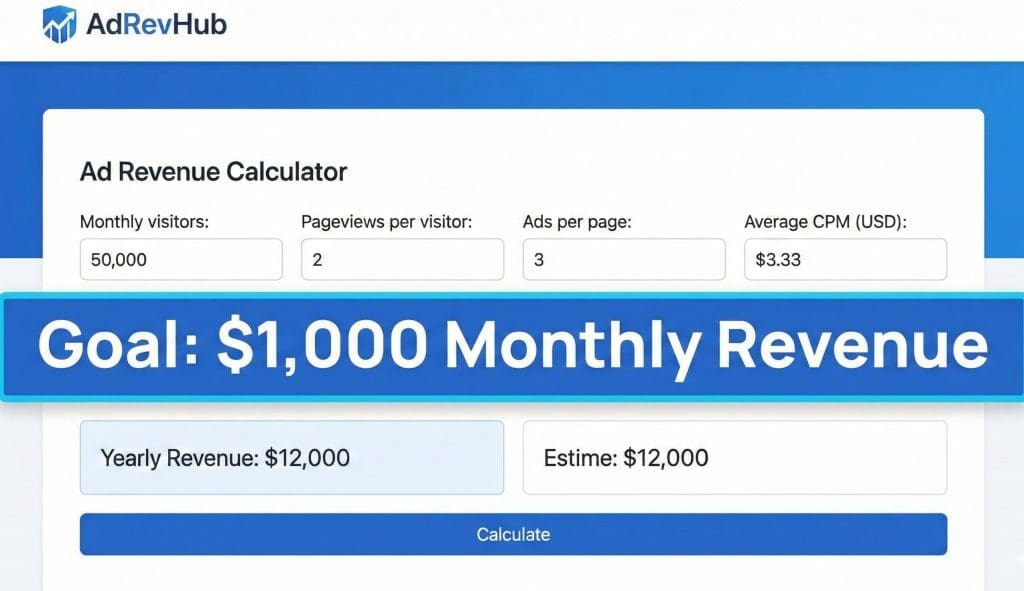
An ad revenue calculator gives you a data-backed estimate of what your website can earn from ads, based on impressions, CPM, and real monetization variables, before you commit time or money.
What Is an Ad Revenue Calculator?
An ad revenue calculator is a tool that estimates how much money a website can earn from display advertising.
It converts traffic data into revenue projections using industry-standard metrics like impressions and CPM.
How Ad Revenue Calculators Work
Most calculators use three core inputs:
- Monthly pageviews or impressions
- Average CPM (cost per 1,000 impressions)
- Number of ad placements per page
The result is an estimated daily, monthly, or yearly ad income.
How to Calculate Website Ad Revenue (Formula Explained)
Understanding the formula helps you trust the estimate.
The Standard Ad Revenue Formula
Ad Revenue = (Total Impressions ÷ 1,000) × CPM
Example:
- 100,000 impressions
- $5 CPM
Estimated revenue: $500
Realistic Revenue Scenarios
- Low CPM ($2): $200
- Average CPM ($5): $500
- High CPM ($12): $1,200
This gap explains why traffic alone never tells the full story.
Key Metrics That Affect Ad Revenue Estimates
Traffic volume is only one piece of the puzzle.
CPM, CPC, and RPM Explained
| Metric | Meaning | Why It Matters |
|---|---|---|
| CPM | Earnings per 1,000 impressions | Standard pricing model |
| CPC | Earnings per click | Depends on user intent |
| RPM | Earnings per 1,000 sessions | Best overall performance metric |
RPM reflects real earnings more accurately than CPM or CPC alone.
Traffic Quality vs Quantity
Revenue increases when traffic has:
- High-value geographies (US, UK, CA, AU)
- Desktop-heavy sessions
- Strong commercial or informational intent
How Much Ad Revenue Can a Website Make?
There is no fixed number, but ranges help set expectations.
Estimated Earnings by Traffic Level
- 10,000 pageviews: $20–$100 per month
- 50,000 pageviews: $150–$600 per month
- 100,000 pageviews: $400–$1,500 per month
- 500,000+ pageviews: $3,000–$10,000+ per month
CPM Ranges by Niche
- Finance, insurance: $15–$40
- SaaS, B2B, tech: $8–$20
- Lifestyle, entertainment: $2–$6
Using an Ad Revenue Calculator to Forecast Earnings
A calculator is most useful when it supports planning and testing.
Using an ad revenue calculator website like
ad revenue calculator
allows you to:
- Test different CPM assumptions
- Compare mobile vs desktop revenue
- Forecast monthly and yearly earnings
Daily vs Monthly vs Yearly Estimates
- Daily: Useful for spotting sudden changes
- Monthly: Best for budgeting and growth targets
- Yearly: Helps with valuation and long-term planning
Common Estimation Mistakes
Avoid:
- Assuming premium CPMs without data
- Ignoring traffic geography
- Counting blocked or non-viewable impressions
Factors That Can Increase or Decrease Ad Revenue
Revenue growth does not always require more traffic.
Ad Placement and Layout
Higher-performing placements include:
- Above-the-fold ads
- In-content display units
- Sticky sidebars or footers
Mobile vs Desktop Revenue
Desktop traffic often earns higher CPMs.
Mobile traffic can still outperform through volume and layout optimization.
Ad Blockers and UX
Ad blockers reduce impressions. Faster pages and cleaner layouts help protect RPM.
CPM vs CPC: Which Model Is Better?
The better model depends on your content and audience.
- CPM: Best for content-heavy sites with high impressions
- CPC: Better for buyer-focused or comparison content
- RPM: Best metric for measuring real success
Most publishers optimize for RPM, regardless of pricing model.
Is an Ad Revenue Calculator Accurate?
An ad revenue calculator provides directional accuracy, not exact results.
What Calculators Can Predict
They help estimate:
- Monetization potential
- Revenue ranges
- Growth impact
What They Can’t Predict
They cannot fully account for:
- Ad network behavior
- Seasonal CPM swings
- Auction-level demand changes
Improving Accuracy
- Use real analytics data
- Segment traffic by country
- Update CPM assumptions regularly
Final Thoughts: From Estimates to Real Earnings
An ad revenue calculator sets expectations and guides decisions.
Used correctly, it helps you:
- Validate monetization potential
- Choose better ad strategies
- Identify revenue optimization opportunities
With realistic inputs and smart execution, estimates turn into consistent ad income.
FAQ: Ad Revenue Calculator
What is an ad revenue calculator?
An ad revenue calculator estimates website earnings using impressions, CPM, and traffic data.
It helps publishers forecast ad income before implementing monetization strategies.
How do you calculate website ad revenue?
Divide total impressions by 1,000 and multiply by CPM.
This formula gives a baseline estimate that improves when RPM is tracked.
How much ad revenue can a website make?
Earnings depend on traffic, niche, and ad rates.
Websites can earn from a few dollars to several thousand per month from ads.
What affects ad revenue the most?
Traffic quality, CPM rates, and ad placement have the biggest impact.
User location, device type, and content intent matter significantly.
Is CPM or CPC better for ad revenue?
Neither is universally better; RPM is the most reliable metric.
CPM favors traffic-heavy sites, while CPC works best for buyer-intent content.
