
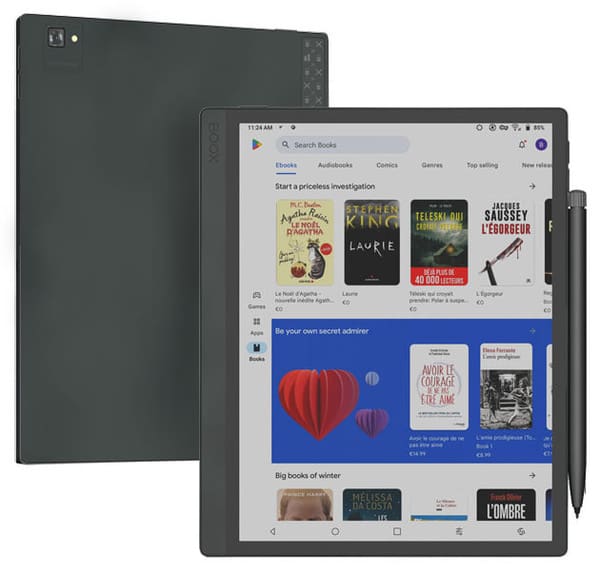
Digital tools continue to shape how people learn, write, and organize information. The Boox Tab Ultra C Pro, an advanced color E-Ink tablet, offers a practical balance between the comfort of paper and the flexibility of digital technology. Its features are designed to help both writers and students manage their workflow efficiently while reducing distractions and screen fatigue.
This article explores how the Boox Tab Ultra C Pro supports productivity through its note-taking tools, multitasking features, and reading capabilities. By understanding its practical benefits, users can make informed decisions about how to integrate this device into their study or writing routine.
A Paper-Like Writing Experience with Digital Flexibility
One of the main advantages of the Boox Tab Ultra C Pro is its color E-Ink screen, which closely replicates the look and feel of real paper. For writers, this means the ability to draft ideas, outline stories, or take structured notes without the eye strain often associated with LCD screens. The included stylus provides smooth handwriting input, allowing for precise strokes that resemble pen-on-paper writing.
Students can also benefit from this tactile writing experience when annotating PDFs, summarizing lectures, or creating handwritten notes. Because the tablet converts handwriting into editable text, it bridges the gap between traditional note-taking and digital organization, helping users keep their work structured and searchable.
Organized Workspaces and File Management
Efficient file organization is essential for productivity. The Boox Tab Ultra C Pro runs on Android, giving users access to cloud services like Google Drive, Dropbox, and OneDrive. This enables seamless synchronization of documents, notes, and reading materials across multiple devices. Writers can draft on the tablet and continue editing on a laptop without worrying about file compatibility.
For students, the ability to organize notes by subject or project makes study sessions more structured. The Boox file management system supports tagging and folder hierarchies, which helps users retrieve materials quickly. This system minimizes the time spent searching for documents and increases focus on actual learning or writing tasks.
Enhanced Reading and Research Tools
The Boox Tab Ultra C Pro is designed for long reading sessions, supporting formats such as EPUB, PDF, and Word documents. The color E-Ink display allows students to view charts, diagrams, and highlighted text clearly, which is helpful for studying visual materials. Adjustable contrast and warm light settings reduce glare, promoting longer and more comfortable reading sessions.
Writers who frequently reference research papers or notes will appreciate the ability to open multiple documents side by side. The split-screen feature allows for quick comparison or simultaneous reading and note-taking, making research-based writing more efficient and less fragmented.
Multitasking and App Integration
Because the device runs a customized Android system, users can install various productivity apps. Tools like Google Docs, Evernote, or Notion integrate well with the Boox environment, allowing seamless transitions between reading, writing, and planning. This flexibility supports a complete workflow without switching devices.
Students can attend online classes, take notes, and access study materials all within one ecosystem. The multitasking interface, including floating windows and task switching, enables users to handle multiple assignments or projects at once, helping maintain a steady and organized workflow.
Focused Work Environment and Distraction Control
Unlike standard tablets, the Boox Tab Ultra C Pro’s E-Ink display naturally limits the appeal of entertainment distractions such as videos or games. Its monochrome and slow-refresh nature encourages focus on reading and writing tasks rather than multitasking aimlessly. This characteristic makes it a productive space for deep work and study.
Writers who struggle with concentration can use the Boox’s minimal interface to reduce interruptions. With notifications turned off and offline note-taking enabled, the device becomes a distraction-free environment ideal for brainstorming, outlining, and drafting content.
Sustainable and Ergonomic Design
The Boox Tab Ultra C Pro offers an environmentally conscious alternative to paper notebooks. By digitizing the note-taking process, students and writers can significantly reduce paper waste while keeping their records organized digitally. The rechargeable battery also supports long working sessions, reducing the need for frequent charging.
Ergonomically, the device’s lightweight build and matte screen reduce glare and wrist strain during extended use. These design considerations make it suitable for users who spend several hours reading or writing each day, supporting long-term productivity without discomfort.
Final Thoughts
The Boox Tab Ultra C Pro provides a practical approach to productivity for writers and students. Its combination of an E-Ink display, Android functionality, and stylus integration creates an efficient workspace that merges traditional writing comfort with digital flexibility.
By offering tools for focused work, organized study, and seamless document management, the Boox Tab Ultra C Pro supports a balanced workflow that helps users stay consistent and efficient in their creative or academic pursuits.