
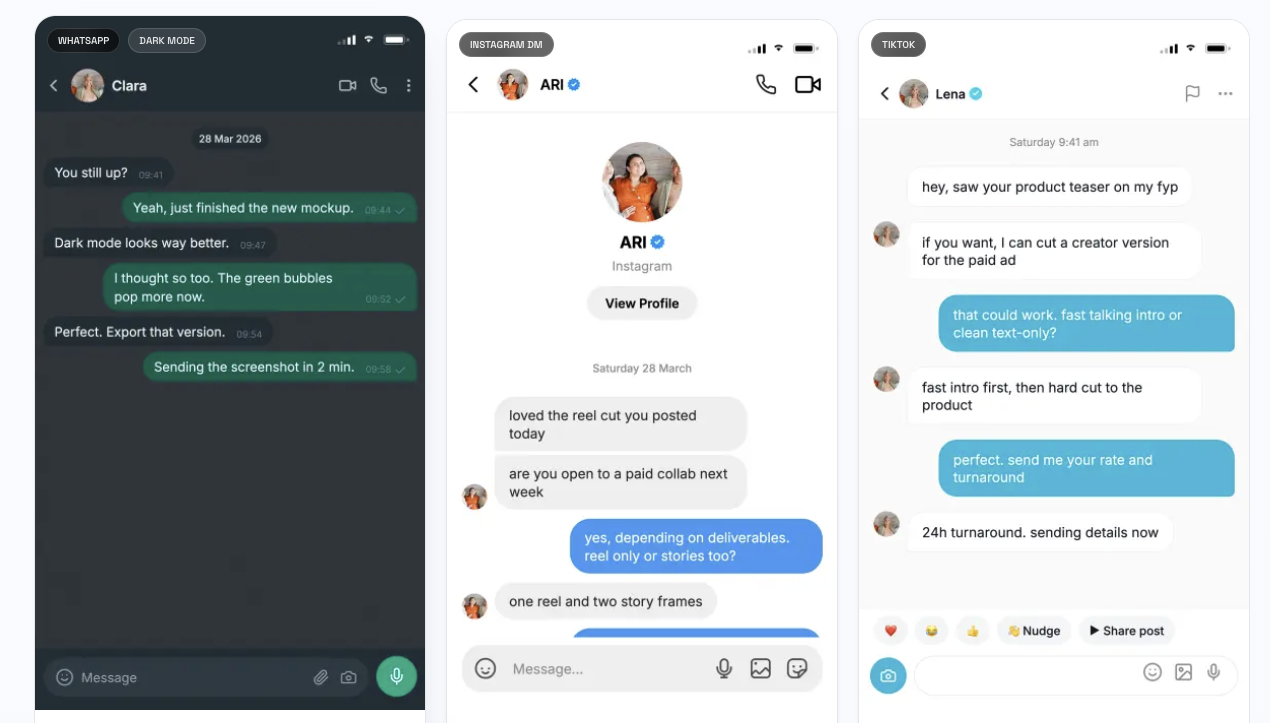
Whether you scroll TikTok, Instagram Reels, or YouTube Shorts, you’ve likely seen them: text story videos where a conversation unfolds message by message, building tension or delivering a punchline. What looks like a screenshot pulled from someone’s phone is almost always purpose-built — and a new category of tools is making that production process faster and more professional than ever.
Fake chat screenshot makers have quietly become a staple in the modern content creator’s toolkit. Here’s why they’re growing in popularity, who’s using them, and what to look for when choosing one.
The Rise of Text Story Content
Short-form video has fundamentally shifted how people consume narrative content online. Creators on TikTok and Instagram discovered early on that text conversations — displayed as animated chat threads — are uniquely engaging. They’re fast to consume, easy to follow, and almost impossible to stop watching once the tension kicks in.
The format spread quickly. Relationship drama, workplace stories, true crime recreations, pranks, dating scenarios — the genre now spans millions of videos and supports a dedicated audience of hundreds of millions of viewers globally.
The catch? Producing these videos at scale with actual screenshots is impractical. Real screenshots require real conversations, real contacts, and real phones — all of which introduce privacy issues, continuity problems, and zero creative control. That’s what pushed creators toward purpose-built tools.
What a Fake Chat Generator Actually Does
A fake chat generator is a browser-based editor that lets you design a realistic-looking messaging conversation from scratch. You control everything: the names, avatars, message content, timestamps, read receipts, typing indicators, and the platform the chat appears to come from.
The best tools in this space go well beyond static screenshots. Modern platforms like TheFake support 25+ chat layouts — WhatsApp, iMessage, Instagram DM, TikTok, Messenger, Telegram, Discord, Slack, Snapchat, and more — and let users export both high-resolution PNG screenshots and animated MP4 videos with message-by-message reveal timing.
That combination of screenshot and video export in one workflow is a meaningful time-saver. A creator working on a weekly posting schedule doesn’t have to bounce between design software, a screen recorder, and a video editor to produce a single piece of content.
Who’s Actually Using These Tools
The use cases are broader than most people assume.
Content creators and social media managers are the most obvious users. They use fake chat tools to produce text story videos, reaction content, and narrative-driven posts across TikTok, Instagram, and YouTube Shorts. Being able to draft, edit, and export in one browser tab — without any design experience — is the core appeal.
Film and video production teams use them to generate prop chat screens for scenes where a character is shown receiving or sending messages. The alternative — building custom UI mockups or using actual phones on set — is slower and harder to control in post-production.
Marketing and advertising teams use chat-format mockups to illustrate product flows, show customer support experiences, or create social-proof-style visuals that look native to the platforms their audiences use every day.
Educators and cybersecurity trainers have found a legitimate use case here too: building realistic-looking phishing or scam examples for digital literacy training, without needing to compromise any real accounts to do it.
UI/UX designers and product teams use them to mock up conversational interfaces quickly before writing a line of code — especially useful in early stakeholder reviews where a polished-looking demo beats a wireframe.
Key Features to Look For
Not all fake chat tools are built the same. If you’re evaluating options for a team or a consistent content workflow, here’s what matters:
Platform coverage. A tool that only does WhatsApp isn’t very useful if your content spans multiple platforms or your audience associates authentically with iMessage or TikTok DMs. Look for a tool that keeps its templates updated as platform UIs evolve.
Video export with timing controls. Static screenshots are table stakes. What separates professional-grade tools from basic generators is the ability to export animated videos with control over message pacing, typing indicators, and reveal order. This is what makes the final content feel cinematic rather than clunky.
No watermark on exports. This matters for production use. A watermarked export is unpublishable in most professional contexts. Tools like TheFake offer watermark-free PNG exports on the free plan and watermark-free video exports on Pro.
AI-assisted scripting. Newer tools are integrating AI to help draft first-pass conversations, which is useful when you need to produce high volumes of content or prototype multiple scenarios quickly before committing to a final version.
Privacy and no-signup access. Because these tools involve crafting realistic-looking personal conversations (even if fictional), a tool that doesn’t require account creation for basic use is a meaningful trust signal. It reduces friction and indicates the product isn’t built around harvesting contact data.
The Legal and Ethical Dimension
This is worth addressing directly, because it comes up. Creating fake chat screenshots and videos for entertainment, filmmaking, marketing, or education is legal in most jurisdictions. The line is crossed when fabricated conversations are presented as real for deceptive purposes — fraud, defamation, harassment, or submitting fake evidence.
Reputable tools in this space are explicit about acceptable use. TheFake, for example, publishes an acceptable use policy that prohibits harmful applications while explicitly supporting creative, educational, and commercial uses. That kind of transparency is a reasonable signal of a legitimate product.
The Production Efficiency Argument
For creators and teams running content at volume, the efficiency case for these tools is straightforward. A workflow that previously required staging a phone, screenshotting or recording a conversation, cleaning up the footage, and exporting for different aspect ratios can now happen entirely in a browser in under ten minutes.
At a posting cadence of three to five videos per week — which is table stakes for growing accounts in the text-story genre — that efficiency compounds quickly. It also opens the door to testing multiple versions of the same concept before committing to production, which is something most creators can’t afford to do when each piece of content takes hours to produce.
Final Thought
Fake chat screenshot and video tools have moved past novelty status. They’re now a legitimate production category used by individual creators, marketing teams, production companies, and educators — each for different but equally valid reasons.
If your content strategy involves narrative, conversation, or text-format storytelling, it’s worth evaluating whether a dedicated tool belongs in your workflow. The time savings are real, the output quality has improved significantly, and the barrier to entry has dropped to effectively zero for anyone with a browser and an idea.
This article was produced for informational purposes. All tools referenced are publicly available and have been evaluated based on their published feature sets and pricing.