

Mobile filming has transformed the way photographers and content creators capture the world. With smartphone cameras now rivaling dedicated equipment in resolution and dynamic range, more professionals and enthusiasts are turning to their phones for serious video work. Yet one persistent challenge undermines even the best mobile footage: shaky, unstable handheld shots. No matter how steady your grip, extended shooting sessions inevitably introduce unwanted movement that degrades your final product. This is where a phone tripod mount becomes an indispensable tool in your filming kit. By securely locking your smartphone onto a stable platform, these compact accessories bridge the gap between casual handheld clips and polished, professional-quality footage. This guide walks you through everything you need to know about selecting, setting up, and using a phone tripod mount effectively. Whether you’re shooting interviews, time-lapses, or cinematic B-roll, you’ll discover how the right mount delivers the stability and versatility that elevate your mobile filming from amateur to exceptional.
What is a Phone Tripod Mount and Why It Matters for Mobile Filming
A phone tripod mount is a specialized adapter designed to securely hold your smartphone and attach it to a tripod or other stabilizing platform. At its core, the device consists of adjustable clamp arms or a spring-loaded cradle that grips your phone, connected to a threaded base that screws onto standard tripod heads. Some models also incorporate a cold shoe adapter for mounting accessories like microphones or LED lights, turning your phone into a fully equipped filming rig.
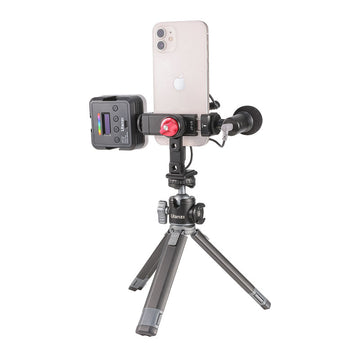
For photographers and videographers invested in mobile filming, a phone tripod mount solves a fundamental problem: it eliminates the human element of instability. Handheld footage, no matter how carefully managed, suffers from micro-vibrations and gradual drift that become glaringly obvious during playback or editing. A secure phone mount locked onto a tripod removes these issues entirely, producing footage with the kind of rock-solid framing that audiences associate with professional production.
Beyond basic stability, the right mount unlocks creative possibilities that handheld shooting simply cannot match. Long-exposure photography, smooth panning movements, consistent framing for multi-take interviews, and perfectly level horizon lines all become achievable when your phone is firmly anchored. The mount also frees your hands to manage lighting, direct subjects, or operate external audio equipment. For anyone serious about elevating the quality of their mobile content, a phone tripod mount isn’t just a convenience—it’s the foundation that every other technique and accessory builds upon.
Essential Features for a Secure Phone Tripod Mount
When shopping for a phone tripod mount, the difference between a frustrating experience and a reliable tool comes down to a handful of critical features. A secure phone mount needs to do more than just hold your device—it must inspire confidence that your expensive smartphone won’t slip, wobble, or crash to the ground mid-shoot. Understanding what separates a dependable mount from a flimsy one helps you invest wisely and film without anxiety.
Stability and Durability in Design
The materials used in a phone tripod mount directly determine how well it performs under real-world conditions. Aluminum alloy mounts offer the best balance of lightweight portability and structural rigidity, resisting flex even when your phone is extended at awkward angles. Reinforced polymer options can also work well for lighter setups, though they may develop play in the joints over time. Look for anti-slip silicone or rubber pads on every contact surface where the mount grips your phone—these prevent scratches while dramatically increasing friction. Reinforced joints and locking knobs made from metal rather than plastic hold their position more reliably during long shooting sessions, where repeated vibrations from wind or nearby foot traffic can gradually loosen cheaper mechanisms. A mount that feels solid in your hands before you even attach it to a tripod is usually one that will keep your phone safe throughout a full day of filming.
Compatibility and Adjustability for Various Phones
No two smartphones share identical dimensions, and phone holders worth considering accommodate this reality through wide-range adjustable arms. Spring-loaded clamp designs typically handle phones from compact models up to large-screen devices, including those wearing protective cases. Before committing to a mount, verify its maximum opening width against your phone’s actual thickness with its case on—many users overlook this and find their mount won’t close securely. Beyond simply gripping the phone, the best mounts offer 360-degree rotation on the ball head and the ability to switch seamlessly between landscape and portrait orientation without removing the device. Some models include a tilt mechanism that lets you angle the phone upward or downward independently of the tripod head, which proves invaluable for overhead tabletop shots or low-angle perspectives. A secure phone mount with smooth, stepless angle adjustment gives you precise compositional control that rigid, fixed-position holders simply cannot deliver, making it far easier to frame your subject exactly as you envision.
Versatile Mounting Options for Different Filming Setups
The beauty of a phone tripod mount extends well beyond pairing it with a single tripod. Today’s mounting ecosystems offer photographers remarkable flexibility to position their smartphones in locations and configurations that would be impossible with handheld shooting alone. Understanding the full range of mounting options available helps you adapt to any filming environment, whether you’re working in a controlled studio or improvising on location in challenging conditions.
Tripod Compatibility and Integration
Nearly all phone tripod mounts use the universal 1/4-inch-20 threaded connection, which means they attach directly to virtually any tripod head on the market. This standard threading works with full-size tripods, tabletop mini tripods, monopods, and even selfie sticks equipped with a screw mount. Quick-release plate systems speed up your workflow considerably—once you thread the mount onto an Arca-Swiss or Manfrotto-style plate, you can snap your phone on and off the tripod in seconds without fumbling with screws between shots. When integrating with a fluid head tripod, ensure the mount’s weight doesn’t exceed the head’s minimum drag threshold, as ultra-light phone setups sometimes feel too loose on heads designed for heavier cameras. Adding a small counterweight or choosing a head with fine-tuned friction control solves this issue and delivers buttery smooth pans and tilts during mobile filming.
Creative and Alternative Mounting Solutions
Standard tripods aren’t always practical, and this is where alternative mounting solutions shine. Clamp-style mounts with flexible gooseneck arms attach to railings, shelves, car sun visors, or desk edges, giving you stable overhead angles for cooking videos or product demonstrations without occupying floor space. Suction cup mounts adhere to glass surfaces, car dashboards, and smooth walls, opening up possibilities for time-lapse sequences from windows or dynamic driving footage. Magnetic mounting systems work with metallic surfaces for rapid repositioning during fast-paced event coverage. For outdoor filmmakers, flexible-leg tripods—such as those offered by Ulanzi—wrap around tree branches, fence posts, or bicycle handlebars, transforming any environment into a viable shooting location. Each alternative expands your creative vocabulary—the key is matching your tripod mounting solution to the specific demands of your scene rather than forcing every situation into a conventional tripod setup.
Step-by-Step Guide to Using Your Phone Tripod Mount Effectively
Owning quality equipment means little without knowing how to use it properly. Many photographers purchase a phone tripod mount only to struggle with setup issues, poor positioning, or avoidable mistakes that compromise their footage. Following a systematic approach to mounting and filming ensures you capture stable, professional-looking content every time you shoot.
Setting Up Your Phone and Mount
Begin by extending the mount’s clamp arms wide enough to accept your phone without forcing it. Place your smartphone centered in the cradle so equal pressure distributes across both sides—an off-center grip creates imbalance that strains the spring mechanism and risks slippage. Before releasing your hands, give the phone a gentle tug in each direction to confirm the secure phone mount has locked firmly. Check that no buttons are being pressed by the clamp arms, as sustained pressure on power or volume keys interrupts recording. Thread the mount onto your tripod’s 1/4-inch screw and tighten until snug, then verify the entire assembly by lightly tapping the phone. If you notice any wobble at the connection point, unscrew and reseat the mount. Remove your phone case if it’s unusually thick or slippery, as textured silicone cases actually improve grip while bulky wallet-style cases prevent proper clamping.
Positioning and Filming Best Practices
With your phone securely mounted, position the tripod at your desired height and spread the legs wide for maximum stability on uneven ground. For mobile filming at eye level during interviews, extend the center column last—it’s the least stable element, so minimize its length when possible. Set your phone to airplane mode before hitting record to prevent incoming calls from ruining a take. When panning, initiate movement from your hips rather than pushing the tripod head with your fingers, which introduces jerky starts and stops. Use a two-second pause at the beginning and end of every pan to give yourself clean edit points in post-production. For windy conditions, hang your camera bag from the tripod’s center hook to lower the center of gravity. Practice framing your composition through the phone screen while it’s mounted rather than adjusting after recording begins—this builds muscle memory for quick setups during time-sensitive shoots and ensures your secure phone mount delivers consistently polished results.
Elevate Your Mobile Filming With the Right Mount and Technique
A phone tripod mount may be one of the simplest accessories in your filming kit, but its impact on your mobile filming quality is disproportionately large. Throughout this guide, we’ve covered what makes these mounts essential—from eliminating the micro-vibrations that plague handheld footage to unlocking creative techniques like smooth pans, time-lapses, and consistent multi-angle interviews. The right mount combines durable construction, a secure phone grip with anti-slip surfaces, and broad compatibility across phone sizes and tripod systems. Versatile mounting options, whether traditional tripods, flexible-leg designs, or clamp and suction cup alternatives, ensure you can stabilize your smartphone in virtually any environment or scenario you encounter.
Knowing how to set up and use your mount properly matters just as much as the gear itself. Centering your phone, confirming a secure fit before every shoot, and following positioning best practices like minimizing center column extension and pausing at the edges of pans will consistently produce cleaner, more professional results. The techniques outlined here improve with repetition, so take your mount out regularly and experiment with different angles, locations, and filming styles. Each session builds the confidence and muscle memory that make quick, reliable setups second nature. Start applying these principles to your next project, and you’ll immediately notice the difference that stable, intentional framing brings to your mobile content.
