

The core principle behind a European VAT calculator is simple: every VAT result comes from the relationship between three numbers, your net price, your VAT rate, and your gross price on Free Exam Calculator
Once you understand that relationship, you can stop guessing. You can check invoices, quote customers correctly, and use a net price calculator, gross price calculator, or VAT amount calculator with confidence.
In the European Union, that skill matters because rates vary by country and by product category. In Germany, you will usually work with 19% or 7%, while cross-border sales can shift you into destination-country rules, the VAT One Stop Shop, or the Import One Stop Shop.
This lesson follows a clear order. First, you will learn the VAT basics. Second, you will use the core formulas to calculate net, gross, and tax. Finally, you will verify invoices, VAT numbers, and calculator results so your numbers hold up in real business use.
Key Takeaways
- VAT is a consumption tax collected in stages, while the end customer carries the final cost. As of January 2026, the EU still requires a standard VAT rate of at least 15%.
- Current standard rates across the EU run from 17% in Luxembourg to 27% in Hungary. Germany uses 19% as its standard rate and 7% as its main reduced rate, while Finland applies 25.5%.
- The three formulas you need are fixed: Net = Gross / (1 + rate), Gross = Net × (1 + rate), and VAT = Net × rate.
- For cross-border B2C sales, the OSS becomes a major shortcut after the EU-wide €10,000 threshold. For imported goods sold to EU consumers, IOSS can be used for consignments up to €150.
- Invoice checks are just as important as the math. A valid invoice should show the parties, date, invoice number, price before tax, VAT rate, and VAT amount, or clearly state reverse charge or the legal basis for an exemption when those rules apply.
Understanding VAT Basics
Value added tax, or value-added tax, is often compared with sales tax, but it works differently. Instead of being charged once at the final checkout, VAT is collected at each stage of production and distribution, with businesses reclaiming eligible input tax on their purchases.
If you want accurate results from a VAT calculator guide or VAT invoice calculator, start by understanding who pays the tax, which rate applies, and whether the transaction is domestic, intra-EU, or outside the EU.
What is VAT and how does it work?
VAT is an indirect tax charged as a percentage of the selling price. A business adds VAT to its sales invoice, collects that tax from the customer, and then offsets eligible VAT it already paid on business costs as input tax.
The modern VAT model traces back to France, where Maurice Lauré helped introduce it in 1954. That history matters because the same basic design still explains why VAT math stays consistent even when the rates change.
- Net price is the amount before VAT.
- VAT amount is the tax calculated on that net price.
- Gross price is the total the customer pays.
- Input tax is VAT a business may deduct on eligible purchases.
Exports of goods to countries outside the EU are usually not charged VAT, but you need proof that the goods actually left the EU. That turns VAT from a theory question into a record-keeping job.
How is VAT applied across the European Union?
The EU VAT Directive sets the framework, but each EU member state sets its own rates inside that framework. The European Commission states that the standard rate must be at least 15%, and countries can also use reduced, super-reduced, or zero rates in defined cases.
That is why your VAT percentage calculator must use the right country, not just a generic European rate. Luxembourg sits at 17%, Germany at 19%, France at 20%, Finland at 25.5%, and Hungary at 27%.
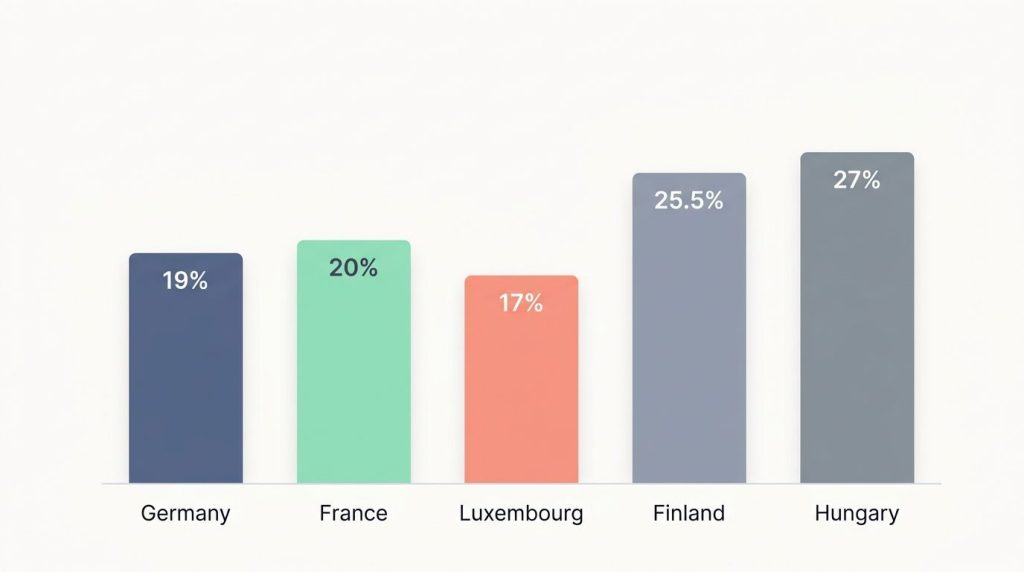
| Country | Standard rate | Why it matters |
|---|---|---|
| Germany | 19% | Common benchmark for most goods and services |
| France | 20% | Frequent comparison market for cross-border sellers |
| Luxembourg | 17% | Lowest standard rate in the EU |
| Finland | 25.5% | Shows how high-rate countries change final pricing fast |
| Hungary | 27% | Highest standard rate in the EU |
Your Europe explains that the OSS lets you register once, file through one portal, and charge the customer-country VAT rate on eligible cross-border B2C sales. For an online tax calculator Europe setup, that means the calculator must be country-aware, not just formula-aware.
What are the differences between net price, gross price, and VAT amount?
Net price is the price before tax. VAT amount is the tax itself. Gross price is net plus VAT.
If your net price is €100 and the VAT rate is 19%, the VAT amount is €19 and the gross price is €119. That same logic works inside any price plus VAT calculator or VAT inclusive calculator.
| Term | Meaning | €100 at 19% |
|---|---|---|
| Net price | Price before VAT | €100 |
| VAT amount | Tax added to net | €19 |
| Gross price | Total payable | €119 |
In practice, B2B quotes often start with net pricing, while B2C prices are usually shown gross. That is why a price excluding VAT calculator and a VAT exclusive calculator are useful for business quotes, while a gross-price view is better for consumer pricing.
Key VAT Calculation Formulas
Every VAT formula calculator is built on the same three equations. Once you know them, you can check any tool, spreadsheet, or invoice in seconds.
How do you calculate net price from gross price?
Use this formula: Net Price = Gross Price / (1 + VAT Rate / 100).
If the gross price is €119 and the VAT rate is 19%, the net price is €119 / 1.19 = €100. This is the fastest way to calculate net from gross VAT.
- Take the gross amount.
- Convert the VAT rate into the divisor, such as 1.19 for 19% or 1.07 for 7%.
- Divide the gross price by that divisor.
- Subtract the net price from the gross price if you want the VAT amount too.
A useful shortcut is this: if you already know the gross price, the VAT portion at 19% can be found as Gross × 19 / 119. That is handy when you are checking receipts quickly without opening a full VAT tax calculator.
How do you calculate gross price from net price?
Use this formula: Gross Price = Net Price × (1 + VAT Rate / 100).
If the net price is €100 and the VAT rate is 19%, the gross price is €100 × 1.19 = €119. This is the standard way to calculate gross from net VAT.
- 19% VAT: multiply by 1.19
- 7% VAT: multiply by 1.07
- 20% VAT: multiply by 1.20
- 25.5% VAT: multiply by 1.255
This matters when you update public prices. A change in VAT rate changes every displayed gross price, even when your underlying net price stays the same.
How do you determine the VAT amount?
Use this formula: VAT Amount = Net Price × (VAT Rate / 100).
If the net price is €100 and the rate is 20%, the VAT amount is €20. You can also work backwards with VAT Amount = Gross Price – Net Price.
If an invoice does not show a VAT amount, there should be a clear reason, such as an exemption or the words reverse charge. Missing tax details are a warning sign, not a formatting issue.
The European Commission’s invoicing rules require the VAT rate and amount payable on a full VAT invoice, unless a specific rule applies. That makes the tax amount more than a calculator output, it is a compliance field.
Steps to Use a European VAT Calculator
A good European sales tax calculator or business VAT calculator should do more than basic math. It should help you pick the correct rate, convert prices in the right direction, and flag issues before they become invoice errors.
How to input the correct VAT rate?
Always choose the country first, then the product or service category. The most common calculator mistake is using the right formula with the wrong rate.
As of 2026, Germany still uses 19% as its standard rate and 7% as its main reduced rate. France commonly uses 20%, 10%, and 5.5%, Austria uses 20%, 13%, and 10%, and Finland applies 25.5%, 13.5%, and 10%.
| Country | Standard | Common reduced rates |
|---|---|---|
| Germany | 19% | 7% |
| France | 20% | 10%, 5.5% |
| Austria | 20% | 13%, 10% |
| Finland | 25.5% | 13.5%, 10% |
If you are unsure whether an item qualifies for a reduced rate, do not guess. A calculator can only be accurate if the tax classification is accurate.
How to enter net price to find gross price?
Enter the net price, select the VAT rate, and let the tool multiply by the correct factor. For example, €100 at 19% returns a gross price of €119.
This is the best setup for quoting B2C prices, building price lists, or testing how a rate change will affect your final sticker price. It also keeps your base commercial price separate from tax.
- Use net-to-gross mode for product pricing.
- Use it again after any VAT rate update.
- Store the net amount in your catalog if you sell in multiple EU countries.
How to enter gross price to find net price?
Enter the gross price and select the correct rate. The calculator divides by the VAT factor and returns the net amount.
This is the mode you want when a receipt, supplier quote, or posted shelf price already includes tax. A simple example is €107 at 7%, which returns a net price of €100.
- Use it to check supplier invoices.
- Use it for expense claims where tax must be separated.
- Use it when a marketplace gives you gross figures and you need net revenue.
How to confirm the accuracy of tax amount calculations?
First, rerun the number manually with the formula. Second, confirm the rate against current country rules. Third, make sure the invoice contains the fields needed to support the result.
Your Europe notes that VIES is a search engine, not a database. If a VAT identification number comes back invalid, it can mean the number exists but is not yet activated for intra-EU trade, so you should not apply zero-rating or reverse charge until that status is clear.
- Cross-check the rate with the current country table.
- Verify the buyer’s VAT number through VIES for cross-border B2B work.
- Use OSS once eligible cross-border B2C sales exceed €10,000.
- Use IOSS for imported consignments up to €150 when that scheme fits the sale.
Examples of VAT Calculations
Examples make the formulas stick. If you can solve a few common cases by hand, you can trust your calculator output much more quickly.
How to calculate 19% VAT on a product?
To add 19% VAT, multiply the net price by 1.19. If the net price is €100, the gross price is €119 and the VAT amount is €19.
Germany uses 19% as the standard VAT rate for most goods and services. That makes it the default setting for many German invoices and the first benchmark you should test in any online VAT calculator.
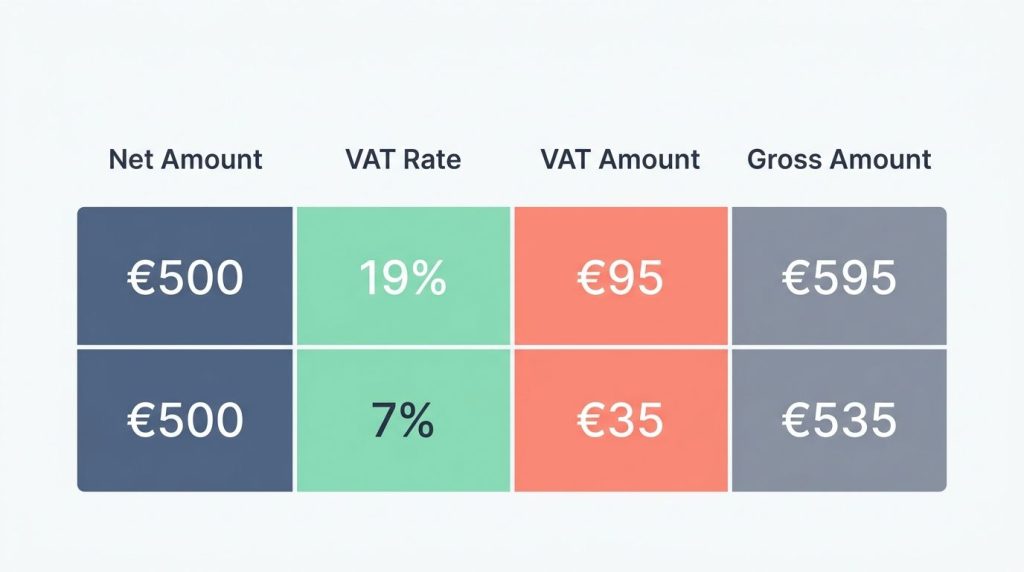
| Net price | VAT rate | VAT amount | Gross price |
|---|---|---|---|
| €50 | 19% | €9.50 | €59.50 |
| €100 | 19% | €19.00 | €119.00 |
| €250 | 19% | €47.50 | €297.50 |
How to derive net price from gross price with 7% VAT?
Use Net Price = Gross Price / 1.07. If the gross price is €107, the net price is €100 and the VAT amount is €7.
Germany’s federal government states that from January 1, 2026, the VAT rate for food served in gastronomy is 7%, while drinks remain taxed at 19%. That means restaurant bills can now contain mixed rates, so a single gross total may need to be split before you calculate anything.
- Food at 7%: €107 gross becomes €100 net.
- Drinks at 19%: €119 gross becomes €100 net.
- Mixed bills: separate each line by rate before checking totals.
How to determine VAT amount for services?
The formula is the same for services and goods: VAT Amount = Net Price × rate. A €100 service at 20% VAT produces a €20 VAT amount and a €120 gross price.
For cross-border services, the rule can change. Since 2015, many digital services are taxed in the customer’s country, and for many B2B services across EU borders the invoice may use the reverse charge procedure instead of adding local VAT.
- Domestic service: add the local VAT rate.
- Cross-border B2C digital service: check the customer-country rate.
- Cross-border B2B service: verify whether reverse charge applies before adding VAT.
Types of VAT Calculators
The right tool depends on how often you calculate VAT and how many countries you sell into. For a single invoice check, a simple web tool is enough. For daily invoicing, you need more automation.
What are online VAT calculators?
Online VAT calculators are browser-based tools that convert net to gross, gross to net, and tax amount almost instantly. They are ideal for one-off checks, quick price testing, and customer support work.
For German-speaking users, a mehrwertsteuer rechner can be useful when they need to calculate VAT quickly, compare net and gross prices, or check whether an invoice total looks correct.
- Best for occasional calculations
- Fast on desktop or mobile
- Useful if they include country rate tables
- Less suitable for audit trails or bulk processing
If a tool offers inclusive and exclusive modes, it already covers most day-to-day checks for freelancers, small shops, and buyers reviewing invoices.
What are business VAT calculators?
Business VAT calculators sit inside invoicing, accounting, or e-commerce systems. They automate repeated calculations, apply country-specific rules, and reduce manual entry.
The German Federal Ministry of Finance notes that, from January 1, 2025, domestic B2B transactions in Germany generally require an e-invoice, with transition rules for issuing them. That means a serious business tool should not stop at math, it should also support structured invoice formats such as XRechnung or ZUGFeRD where needed.
- Automatic rate updates
- Invoice generation
- VAT ID checks
- OSS and IOSS support
- Audit logs and exports
This is also where VAT in the digital age becomes practical. Since the EU adopted the ViDA package on March 11, 2025, it makes sense to choose software that can adapt to more digital reporting over time.
What are price-inclusive vs. price-exclusive VAT calculators?
A VAT inclusive calculator starts from the gross price and extracts the tax. A VAT exclusive calculator starts from the net price and adds the tax.
| Calculator type | Starts with | Best use |
|---|---|---|
| Inclusive | Gross price | Checking receipts and B2C posted prices |
| Exclusive | Net price | Preparing quotes and B2B invoices |
One important warning: an exempt sale and a 0% calculation are not always the same thing. If a transaction is exempt or under reverse charge, the invoice wording matters just as much as the number.
Common VAT Rates in Europe
Standard and reduced rates vary widely across Europe, so a calculator must use current country data. Even a small rate difference can change margins, advertised prices, and invoice totals.
What are the standard VAT rates in EU countries?
As of January 2026, standard VAT rates in the EU range from 17% in Luxembourg to 27% in Hungary. Germany remains at 19%, France at 20%, and Finland at 25.5%.
That puts the EU average at roughly 22%, which is why cross-border B2C sellers cannot rely on one default rate. A product priced well in Germany can look much less competitive in a higher-rate market once gross consumer pricing is shown.
- Lowest standard rate: Luxembourg, 17%
- Highest standard rate: Hungary, 27%
- Germany: 19%
- France: 20%
- Finland: 25.5%
What are the reduced VAT rates for specific products or services?
EU countries can apply up to two reduced rates as low as 5%, and some also use super-reduced or zero rates for limited categories. This is where category errors usually happen.
Examples help. Austria uses 10% and 13%, Belgium uses 6% and 12%, France uses 5.5% and 10%, and Germany uses 7% for many reduced-rate supplies.
| Country | Common reduced rates | Typical use |
|---|---|---|
| Germany | 7% | Food, books, selected services |
| France | 5.5%, 10% | Food, books, hospitality categories |
| Austria | 10%, 13% | Food, culture, selected services |
| Belgium | 6%, 12% | Essentials and selected categories |
Do not treat reduced rates as “discount VAT.” They apply only when the law puts that item or service in the reduced category.
Which products or services are exempt from VAT?
Exports of goods outside the EU are usually VAT-free if you keep the proof of export. Certain transactions can also be exempt under EU and national rules, including some financial, insurance, health, education, or property-related supplies.
For intra-community deliveries of goods, the exemption usually depends on more than good intentions. You generally need a valid customer value-added tax identification number and proof that the goods moved to another EU country.
- Exports outside the EU usually require transport or customs evidence.
- Cross-border B2B goods inside the EU require a valid VAT ID check.
- Exempt transactions still need correct invoice wording and records.
Benefits of Using a VAT Calculator
A VAT calculator saves more than time. Used correctly, it improves pricing accuracy, supports invoice reviews, and lowers the chance of filing the wrong amount.
How does a VAT calculator improve accuracy in tax calculations?
It applies the right formula every time. That removes the most common manual errors, such as multiplying when you should divide, or forgetting that a posted price already includes VAT.
It also forces a cleaner workflow. You enter the country, rate, and amount, then compare the result with the invoice fields instead of trusting the total printed on the page.
Quick audit rule: if gross price ≠ net price + VAT amount, stop and check the rate, rounding, or invoice status before you book the transaction.
How can it save time for businesses and individuals?
A calculator turns repetitive tax math into a few clicks. That matters when you quote customers, review supplier bills, or split gross receipts into revenue and tax for bookkeeping.
- Add VAT in a spreadsheet: Net × (1 + rate)
- Remove VAT in a spreadsheet: Gross ÷ (1 + rate)
- Find VAT only: Gross – Net
- Test benchmark: €100 at 19% should become €119
Those quick checks are enough for a freelancer. A larger business can save even more time by connecting the same logic to invoicing and product pricing.
How does it simplify complex transactions?
Complex VAT work usually comes from one of three issues: multiple countries, multiple rates, or special schemes. A strong calculator or connected tool makes all three easier to manage.
For example, cross-border B2C sales within the EU use destination-country VAT, OSS can centralize reporting, and IOSS can pre-collect VAT on imported goods up to €150. Online marketplaces can also become the deemed supplier in some cases, which changes who must account for the tax.
- Multi-country pricing becomes consistent
- Reduced-rate items are easier to separate
- OSS and IOSS rules become easier to apply
- Invoice reviews become faster and more repeatable
VAT Compliance and Record-Keeping
Correct VAT math is only half the job. You also need invoices, records, and verification steps that support the number you calculated.
Why are accurate VAT invoices important?
An accurate invoice protects both seller and buyer. Under EU invoicing rules, a full VAT invoice should include the issue date, a unique invoice number, supplier and customer details, a description of the goods or services, the VAT rate, and the VAT amount payable.
If the customer is liable for the tax, the invoice should say reverse charge. If the transaction is exempt, the invoice should point to the exemption basis instead of leaving the tax line vague.
- Seller name and address
- Customer name and address
- Invoice date and sequential invoice number
- Description and quantity
- Net amount, VAT rate, VAT amount, and total
- VAT ID numbers where required
That detail is what supports input VAT deduction. A neat-looking invoice with missing tax data can still fail a review.
How to maintain records for tax authorities?
Keep every invoice, credit note, receipt, and payment confirmation in a system you can search quickly. For cross-border work, keep VAT number validation logs and transport evidence too.
In Germany, the Federal Central Tax Office (BZSt) issues the USt-IdNr. as a separate number from the regular tax number. Your personal Steuer-ID is a different identifier and is usually not what belongs on business invoices.
- Store the invoice itself
- Store proof of payment
- Store VAT ID validation evidence
- Store shipping or delivery proof for exempt intra-EU supplies
- Store OSS records for the required 10-year period
How to avoid penalties for incorrect VAT reporting?
Build a simple control routine. Check the rate, verify the buyer status, confirm the invoice wording, and file on time.
Most VAT errors come from a short list of avoidable mistakes, not from difficult formulas.
- Using the wrong country rate
- Treating a reduced-rate item as standard, or the other way around
- Applying exemption or reverse charge without a valid VAT ID check
- Keeping weak records for exports or intra-EU deliveries
If a sale is cross-border and the facts are unclear, pause before invoicing. Correcting a draft invoice is easy. Correcting a reported VAT position is harder.
Tips for Choosing the Right VAT Calculator
The best VAT calculator is the one that matches the way you actually sell. A one-person consultancy needs clarity and speed. An e-commerce business needs automation, country rules, and records.
What features should you look for in a VAT calculator?
Look for a tool that handles country-specific rates, inclusive and exclusive modes, and a clean breakdown of net, VAT, and gross. If you sell across borders, add VAT ID checks and OSS support to your must-have list.
A reliable umsatzsteuer rechner should make it easy to switch between VAT rates, calculate tax from net or gross amounts, and review the final result before using it for pricing or invoicing.
- Current EU rate table
- Net-to-gross and gross-to-net modes
- Separate VAT amount display
- Invoice export or copy-ready summaries
- VAT ID validation support
- Audit log for saved calculations
If you invoice German B2B customers, a business-grade tool should also support structured e-invoice output or an easy path into your invoicing software.
How to ensure compatibility with multiple VAT rates?
The tool should let you switch between standard, reduced, exempt, and reverse-charge scenarios without rebuilding the calculation from scratch. That matters if you sell food, books, services, and cross-border orders under one brand.
| Capability | Why it matters |
|---|---|
| Country-based rate selection | Prevents wrong default rates |
| Product or category mapping | Helps apply reduced rates correctly |
| OSS and IOSS support | Reduces manual cross-border work |
| Reverse charge option | Avoids adding VAT when the customer must self-account |
A calculator that only asks for one rate and one number is fine for learning. It is too limited for real cross-border commerce.
How to select calculators with user-friendly interfaces?
Choose a tool with clear fields for net price, gross price, and VAT rate, plus a visible explanation of what the result means. You should be able to tell in one glance whether you are adding VAT or removing it.
A practical test is simple. Run these two benchmarks before you trust a new tool: €100 at 19% should return €119, and €107 at 7% should return €100 net. If the interface makes those checks easy, it will probably be easy to use under pressure too.
- Clear labels for net and gross
- Instant recalculation
- Visible rate selector
- Simple copy or export options
- Helpful error message for invalid entries
Conclusion
This European VAT calculator guide gives you a practical way to work out net price, gross price, and the tax amount without guessing. Start with the correct country rate, use the right formula, and confirm the invoice shows the VAT treatment clearly.
For cross-border work, verify the buyer’s VAT number through VIES or, in Germany, through the Federal Central Tax Office (BZSt) process when needed. Keep VAT-compliant invoices and solid records, and your calculator results will be easier to trust, file, and defend.
FAQs
1. What is the European VAT Calculator Guide?
The European VAT Calculator Guide shows how to work out net price, gross price, and tax amount using a simple VAT calculator.
2. How do I work out net price from a gross price?
Divide the gross price by 1 plus the VAT rate, then round as needed. The calculator uses the VAT rate for a European country to give the net price.
3. How do I work out the tax amount?
Subtract the net price from the gross price, or multiply the net price by the VAT rate. The tool then displays the tax amount clearly.
4. Why use a VAT calculator and this guide?
It saves time, cuts mistakes, and helps you set clear prices for sales and invoices. Use it to plan budgets and compare VAT rules across European countries.