
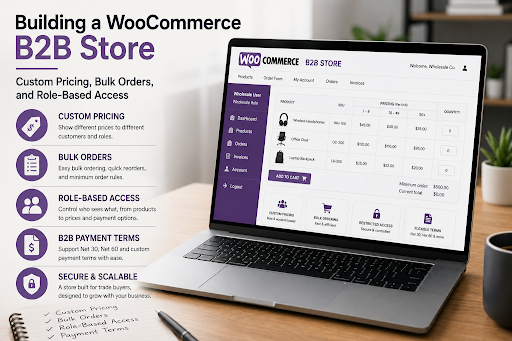
It’s possible to run a B2B business with WooCommerce, but you need to do it right: It’s not just about adding a B2B plugin, but about building a B2B store in the first place. The terms of custom pricing, bulk ordering and role-based access are non-negotiables for wholesale businesses. These are the things that are built upon.
B2B Commerce Has Different Rules
Business to Business selling is quite different from B2C selling. Purchasing is more complex, slower and may involve more parties. Order volumes are increased. Negotiated prices, tiered or account specific. Payment terms don’t just end at the cashier when you buy with a card.
When building a WooCommerce store for retail, you’ll be turning off every B2B buyer. They will pay prices that are not in accordance with their agreed prices. They’ll face orders with minimum order requirements they did not anticipate. With a Net 30 account they will be expected to pay upfront.
B2B building involves creating the entire buying process according to the way that business buyers buy, and not consumers. WooCommerce does okay with this when it comes to architecture and the right WooCommerce development services supporting it.
Custom Pricing: The Core of Every B2B Store
The ability to show different prices to different customers is a feature that is of utmost importance to a B2B WooCommerce store. The distributor should never be the same price as the retail buyer. A negotiated rate should be automatically applied to a key account with a long-standing relationship without having to apply a coupon or call sales.
How Role-Based Pricing Works
Role-based pricing is the most scalable pricing method for B2B with WooCommerce. All customer accounts have a wholesale, distributor, trade, or VIP role assigned to them and pricing rules are attached to a customer role at product, category or store-wide level.
Once a Customer logs in, WooCommerce automatically shows them the appropriate pricing all over the catalogue, based on the roles they have. Manual intervention is not required. The appropriate price is displayed on the product page, in the shopping cart and at the time of checkout, without requiring any action from the customer.
Account-Specific Pricing for Key Clients
These are not enough for larger accounts where pricing has been negotiated on an individual basis. These customers require individual account pricing, not based on role.
This will need a more bespoke solution which normally will require a table in the database to store the price of products per user ID. It’s more complicated to develop, yet vital for any B2B store that has a collection of critical accounts with distinct commercial terms.
Volume and Tiered Pricing
The majority of B2B buyers anticipate that price will alter according to the number of units purchased. The unit price should decrease as the number of units purchased increases: 10 units, the unit price should be lower than 1 unit, and 100 units, the unit price should be still lower. The tiered pricing logic should be transparent, preferably appearing on the product page as a pricing table on the product page, before the customer places an order.
If done “clearly”, tiered pricing effectively promotes higher order values. The next price break is clearly visible to the buyer and they may often order more to get to the next price level.
Bulk Ordering: Removing Friction for High-Volume Buyers
If a B2B buyer is placing a 200-line order on a regular WooCommerce product page, he or she will be looking for another supplier. When it comes to online shopping, the usual process of browsing a product, adding one to cart, and browsing another product, adding one to cart, goes out the window when the customer has to place an order for dozens of SKUs.
Order Forms and Bulk Add-to-Cart
The category browse experience is replaced by a dedicated B2B order form, which has a spreadsheet-like interface. The buyer is presented with a list of products, quantity, current pricing and SKUs. They add as many as in a single line, and add everything to the shopping cart.
This is in line with the mental model of a buyer who already knows what he wants. It eliminates the hassle of browsing through product pages, and significantly cuts down on the time spent placing a large order.
Reorder Functionality
B2B buyers are known to buy the same products at regular intervals. The capability to pull up an old order, and place it again with one click, is a feature that would be nice to have in retail stores but is a necessity for B2B buyers.
It saves the time cost of replenishment orders, prevents buyer convenience ordering from the competitor and enhances the loyalty from a store really knowing how trade buyers work.
Minimum Order Quantities and Cart Rules
The majority of B2B business operations have minimum order quantities, some may be the minimum amount in the cart, minimum amount of a product or minimum amount of products on a pallet. With these rules, it is imperative to communicate at the cart level exactly what is needed and how near the buyer is to acquiring it.
One of the quickest ways to aggravate a trade buyer is to not clearly communicate these rules. The constraint is valid. The surprise at checkout is not one that the experience of hitting is not.
Role-Based Access: Controlling What Each Buyer Sees
Not all B2B catalog products are available for all customers. The complete range should be seen by a distributor. Certain categories may only be available to a trade buyer. No one can place a purchase on a new account until credit has been approved.A new account – without credit approval – should only be able to browse, it should not be able to place an order.
Restricting Catalogue Visibility by Role
Product/Category Visibility by User Role can be enabled in WooCommerce. If it is noted as only available to wholesale customers, then it will not be listed in the catalogue for a guest or retail visitor. This not only maintains a clean buying experience for each customer segment, but avoids having separate stores dedicated to each segment.
In stores with a wide variety of products and different customer groups, this transparency control is also commercial. The full range to the distributor and a subset to the direct retail buyer is a way to maintain the integrity of the channel and avoid confusing prices between the segments.
Gating the Store for Approved Accounts Only
There are a lot of B2B businesses where the client has to get the trade account in order to order. This means the store, or at least a pricing and ordering system, must be totally password-protected and there must be a front-facing application process for new accounts.
This model is not a buying surface, it is a brand and product discovery surface. Prices and checkout can only be viewed/attempted by approved, logged in accounts. This is a typical B2B scenario and one that WooCommerce is good at when properly set up from the beginning.
Multi-User Company Accounts
There are usually several individuals in a business that are involved in the act of making a purchase in a B2B store. A purchasing manager, department head, operations coordinator etc. Every one of them must have their own login, they will share the company’s order history together, and they can place orders based on the order history that has been agreed upon by the company.
One of the more complex parts of a B2B WooCommerce website development is this type of company account setup. It needs a custom account structure that associates user profiles with a parent company record, which is beyond what WooCommerce can do out of the box, and normally requires custom development or a specialist B2B plugin appropriately mapped to the business structure.
Payment Terms and Checkout for B2B Buyers
The pay first, card later model (the retail model) doesn’t work well in most B2B relationships. The terms of these trade accounts are that they will be billed and paid on time as agreed. A B2B WooCommerce store that requires payment at the time of checkout will only lose accounts to similar B2B systems that are already in use in the business world.
For the Net 30, Net 60 or custom payment terms, the checkout flow needs to be set up so that approved accounts can order on invoice, and then make a payment in a different process, outside of the normal WooCommerce payment gateway flow. Having Purchase order number fields, credit limit enforcement and outstanding invoice visibility in the customer account is crucial for a well-constructed B2B WooCommerce store.
This is all possible with WooCommerce. Everything needs to be deliberate and expertly implemented. It’s where the investment in specialist WooCommerce development services will make or break a B2B store and whether it’s a real trade platform or a facadelike one.
Build Once, Built Right
The most expensive way to create a B2B WooCommerce store is to create it as a retail store, and then add B2B functionality as you encounter issues. Every patch generates other dependencies, other edge cases, other fragilities in a system that was never designed to support the weight being put on it.
The best way to go about this is to outline the needs of the B2B model in terms of pricing tiers, ordering workflows, access rules, payment terms, account structures, etc., before any plugin is installed, and build the architecture around these needs from the outset.
Stores constructed like this have a sound growth path. They expand their existing customer base without restructuring. They order volumes without any disruption to the operations. Also, they provide a tradesman what they want, and they make them want more, instead of looking elsewhere.
That is what you’ll get when you have an experienced Woocommerce Development Service that takes B2B commerce seriously rather than as a variant of a retail build.