

Bespoke Production vs. AI Generation: The Underrated Efficiency Equation
When they need a soundtrack, the first instinct for many advertisers and content creators is to commission a custom track. Their reasoning sounds perfectly sensible: AI-generated music is “unprofessional,” and spending a few thousand yuan on a reliable musician at least guarantees quality.
But once you truly break down the numbers across three core metrics—time, money, and revision costs—you uncover a glaring truth. For 80% of short videos, feed ads, and daily content, the cost of AI-generated soundtracks is just 1/500th of custom production, and it takes only 1/200th of the time.
This isn’t an argument that AI can outperform the creative ceiling of a dedicated professional team. The real question is: does your specific project actually require that ceiling? Using a sledgehammer to crack a nut usually results in blown budgets, delayed timelines, and videos that miss their peak trend window entirely. Especially when you are on a daily or weekly publishing schedule, prioritizing maximum production value over speed introduces a massive timeline risk.
The goal of this article isn’t to convince you to abandon bespoke human production. Instead, we want to help you lay out the math so you can use real data to make smarter, more rational decisions for every scenario.
The Checklist: Comparing the Two Approaches Across Four Dimensions
When choosing a music sourcing channel, advertisers and creators care about four primary decision factors: cost, turnaround time, revision expense, and copyright ownership. These four dimensions directly dictate your project’s ROI and risk exposure. The following comparison is based on real market rates and actual usage data to give you a clear view of the true cost structures.
| Dimension | Bespoke Production | Generated via MakeBestMusic |
| Cost | ¥800 – ¥1,500 / track | ¥0 – ¥30 / track |
| Time | 5 – 12 days | 30 minutes |
| Revision Cost | Extra fees apply after 3 rounds | Unlimited |
| Copyright Ownership | Requires complex agreements and legal terms | One-click commercial use, fully licensed |
To put it plainly:
- Bespoke production is best for: High-end brand campaigns, complex emotional progression, and projects requiring live vocal performances.
- MakeBestMusic generation is best for: Short video BGM, feed ads, livestream background music, and daily content.
- The low-cost, high-efficiency hybrid: Use MakeBestMusic to generate a draft version as an “emotional reference,” then hand it off to a human musician to polish. This approach can slash communication costs and revision time by at least 50%.
Cost: 1/500—Where Does This Drastic Price Gap Come From?
If you are trying to maximize project margins on a tight budget, hiring student freelancers or novice musicians might only cost you $50 to $150, but their quality and delivery reliability are highly unpredictable. Mid-tier independent musicians charge between $300 and $800, while professional agencies or well-known producers command $800 to $1,500 or more per track.
This pricing covers the entire workflow—composition, arrangement, mixing, and mastering—but it rarely includes open-ended revisions. Most custom contracts explicitly state: “3 free revisions included; subsequent revisions billed per round.”
MakeBestMusic operates on a completely different pricing model. The platform utilizes a credit system where free users receive daily creation credits, and paid subscription plans unlock higher generation quotas. With a standard subscription plan, generating a single song costs roughly ¥10 to ¥30, and this flat fee includes unlimited regenerations and tweaks. You can generate 5 different versions in 30 minutes, pick the one that comes closest to your vision, fine-tune it, and the entire process won’t cost you more than ¥30.
This structural cost difference becomes even more pronounced when scaling your content output: If you are a daily vlogger or a feed-ad performance team requiring 10 to 20 tracks a week, a bespoke human production budget will run you at least ¥10,000 a month. Meanwhile, using MakeBestMusic keeps your monthly costs under ¥300. This 1/500th cost differential determines whether a lean team can afford to consistently push out high-quality content or not.
Time: 5 Days vs. 30 Minutes—The Efficiency Chasm
The time investment required for bespoke music production is frequently underestimated. From submitting your creative brief to receiving the first draft typically takes 3 to 5 days. If the initial draft falls short and needs adjustments, each round of revisions adds another 2 to 3 days. Factor in client feedback loops and final delivery, and the entire window spans 5 to 12 days. While that timeline is acceptable for brand TVCs or long-cycle campaigns, a 5-day wait means the window of opportunity has already slammed shut for viral trends, daily videos, or urgent ad placements.
Conversely, by leveraging MakeBestMusic’s text-to-song functionality, AI technology allows you to condense this entire timeline into under 30 minutes.
Let’s walk through it:
- Find Create Music in the top right corner of the homepage.
- Open Custom Mode.
- Input your style description and lyrics, then click the Generate button.
- The system will deliver two distinct versions for you to choose from within 2 to 3 minutes.
If you aren’t completely satisfied, you can tweak the Style Prompt or Meta Tags and hit generate again, waiting just another 2 to 3 minutes. Even if you need to generate 5 different versions for A/B testing, the entire workflow stays well within 30 minutes.
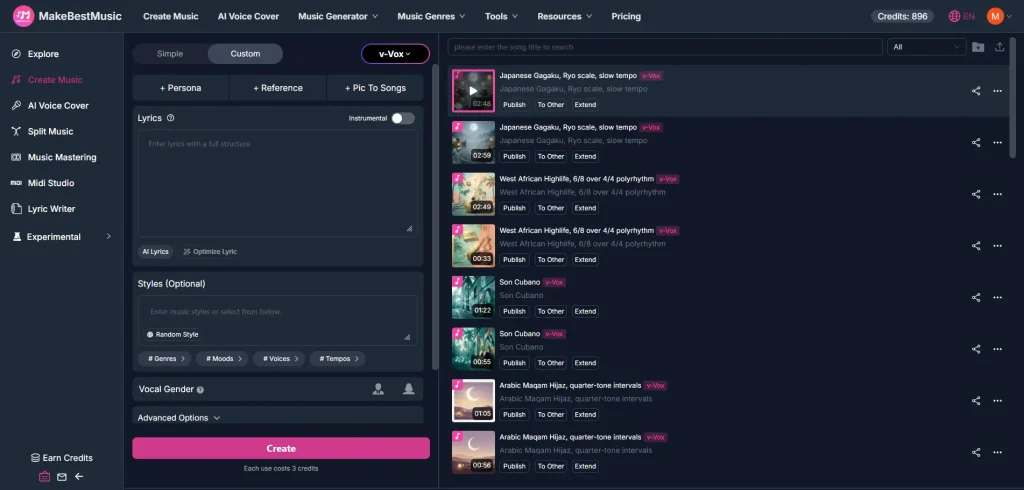
This speed advantage becomes absolutely critical in the following scenarios:
- Riding viral trends: Social media trends usually have a shelf life of only 24 to 48 hours. You cannot afford to wait 5 days for a custom track.
- Ad creative testing: Paid feed ads require rapid-fire testing of multiple asset variations to quickly identify the highest-converting combination.
- Livestream BGM: Broadcasters need to quickly pivot background tracks based on shifting stream themes and cannot book a musician a week in advance.
Another hidden dimension of time is communication overhead. When commissioning a musician, you have to use abstract language to describe subjective concepts like “warm but not overly sentimental” or “high-energy but not noisy.” There is always an inevitable loss of information between what the musician interprets and what you actually want. With MakeBestMusic, you can “fail fast” by generating multiple versions on the fly. This allows you to replace abstract descriptions with concrete audio demos, drastically reducing communication friction.
Revision Costs: Unlimited vs. Per-Round Surcharges
Revision fees are the most frequently overlooked hidden expense in custom music production. While most contracts guarantee “3 free revisions,” those 3 rounds rarely cut it in real-world scenarios. Your first round might be adjusting the tempo; the second might be swapping out an instrument; the third might change the emotional direction. By the time you realize you still need to balance the volume levels or add a transitional bridge, you have likely entered surcharging territory. Each additional revision round runs between ¥200 and ¥500. If your project timeline is extended or your project scope changes frequently, revision fees can easily eclipse the initial quote.
In contrast, top-tier AI tools like MakeBestMusic reduce the marginal cost of revisions practically to zero. Once a track is generated, you can use the Extend feature to lengthen it, use the Split Music feature to export separate stems for secondary editing inside your DAW, or simply adjust your prompts to generate a new iteration. This freedom of unlimited revisions allows you to endlessly polish your track without blowing your budget until you hit the perfect version.
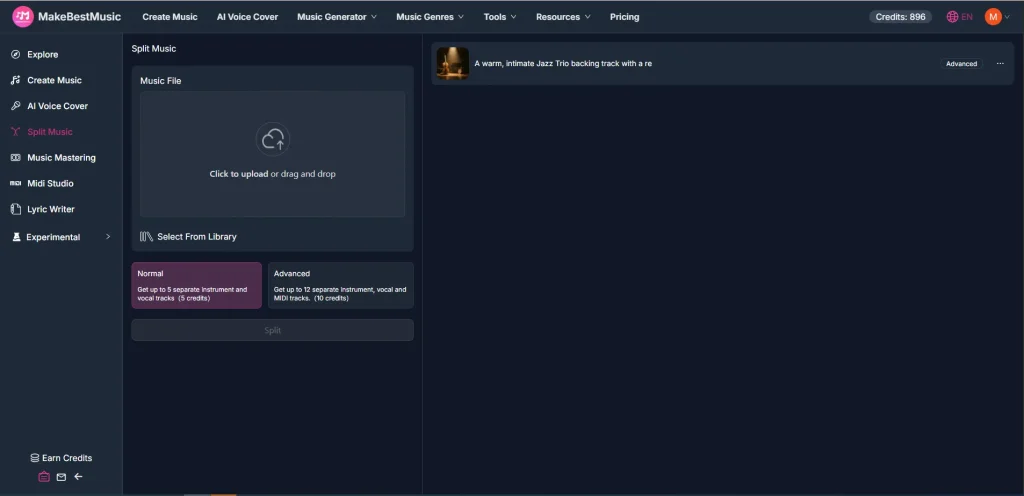
More importantly, MakeBestMusic’s revisions are instantaneous. Tweak your Style Prompt, click Generate, and you will hear a new version in under 2 minutes. When working with a human creator, every single change leaves you waiting 2 to 3 days, a delay that can severely derail project momentum—especially when juggling multiple projects at once.
Copyright Ownership: Complex Agreements vs. One-Click Licensing
Copyright ownership in custom music production is a legal gray area prone to disputes. A standard production contract typically stipulates that “the client receives usage rights, while the creator retains attribution and adaptation rights.” However, the scope of those “usage rights” requires meticulous definition: Does it cover commercial use? Is secondary editing permitted? Can it be deployed across multiple platforms? If the contract terms are vague, you open yourself up to future copyright claims. Furthermore, some musicians charge a premium to “buy out” the copyright completely, a fee that can run 2 to 3 times the initial production cost.
MakeBestMusic bypasses this with a refreshingly straightforward copyright policy: tracks generated under a paid subscription plan grant the user full commercial usage rights, with no need for additional contracts or licensing fees. You can seamlessly use your generated music for YouTube videos, TikTok ads, corporate promos, or any commercial project without the platform asserting any rights or claims. This “one-click commercial use” model eliminates copyright risks and saves your legal team massive amounts of review time.
For teams focused on scaling content creation, copyright clarity is paramount. If you are producing 10 ad creatives a week and have to sign a separate copyright agreement for every single one, legal overhead and administrative costs pile up fast. MakeBestMusic automates commercial licensing for all generated audio, removing the need for track-by-track validation.
The Verdict: 3 Questions to Lock In Your Sourcing Strategy
Now that we’ve broken down these four financial and operational metrics, the decision framework becomes crystal clear: it all comes down to which approach offers the higher ROI for your specific situation.
Instead of overanalyzing whether “AI is professional enough,” ask yourself these practical questions about your project attributes. Your answers will naturally point you toward the right path.
Question 1: What is the expected shelf life of your video?
Your content’s lifecycle dictates the maximum production timeline you can reasonably afford. If you are producing trend-jacking short videos or daily content, the shelf life is usually under 3 days—dropping on day one, peaking on day two, and fading by day three. In this fast-paced ecosystem, waiting 5 to 12 days for a custom track means the trend will be dead and buried before your video is even finished.
Under 3 days (Trends / Daily Content) → Use MakeBestMusic to move fast.
Daily vloggers, trend-focused accounts, and performance ad teams all fit here. You need a usable soundtrack within 30 minutes, not a “perfect” masterpiece 5 days late. MakeBestMusic’s rapid-fire generation isn’t a luxury here—it’s an absolute necessity.
Over 30 days (Brand Campaigns)→ Consider human production.
If your project is a flagship brand TVC, a corporate documentary, or a long-term marketing campaign designed to run for months or years, spending 5 to 12 days on bespoke production is well worth it. These high-stakes projects demand precise emotional nuances, exact brand alignment, and utter uniqueness—scenarios where human artistry truly shines.
Somewhere in between→Generate a draft via AI, then hire a pro to refine it.
If your project lifecycle sits between 1 and 4 weeks, take the middle ground. Use MakeBestMusic to spin up 5 variations as “emotional references,” select the closest match, and have a musician use that reference as a blueprint for the final track. This workflow cuts communication overhead by over 50%, because the musician doesn’t have to decipher abstract text—they are optimizing an existing audio sample.
Question 2: How much are you willing to pay for “total uniqueness”?
Soundtrack uniqueness is a requirement that is frequently overemphasized. Many creators worry that “anyone can generate what AI makes, so it lacks identity.” In reality, audiences watching short videos or feed ads rarely pay attention to whether the background music is entirely unique; they remember the content itself. The value of true uniqueness must match the actual needs of the project.
Under ¥50 →MakeBestMusic.
If your budget is under ¥50, getting a usable custom track from a professional is impossible. You would be restricted to student freelancers or beginners, leaving quality and delivery up to chance. You are far better off using MakeBestMusic and reallocating those savings into video production or ad spend to drive a higher ROI.
Over ¥200 →Consider human production.
If you have the budget flexibility to spend upwards of ¥200 for a completely exclusive track, and your project genuinely requires highly customized audio (like a brand theme song or product launch music), bespoke production is the logical choice. This price bracket gives you access to solid independent musicians, ensuring reliable quality and delivery.
Not sure → Run 5 versions through MakeBestMusic first.
If you aren’t sure whether your project truly demands an exclusive track, the smartest move is to generate 5 options using MakeBestMusic and run a quick test flight to see which one converts best. If data shows an AI-generated version is already hitting your performance KPIs, there’s no need to spend more on custom production. If performance falls short, you can take those conversion metrics and your AI reference tracks to a musician. Your brief will be infinitely sharper, and your communication will be much more efficient.
Question 3: How complex are your emotional cues?
Emotional precision is the primary dividing line between AI generation and human craft. If your brief uses broad emotional directions like “warm,” “epic,” or “melancholy,” AI generation handles it effortlessly. But if your creative requires hyper-specific alignment—such as “warm for the first 30 seconds, building tension from 30 to 45 seconds, followed by an explosive climax that remains clean and uncluttered”—current AI tools will struggle to execute that level of cinematic synchronization.
Broad direction is fine → AI music is more than enough.
The vast majority of short videos, feed ads, and livestream setups fall into this bucket. You need a track that feels right for the mood, not frame-by-frame emotional synchronization. MakeBestMusic’s Style Prompt accommodates rich descriptive language (e.g., “warm and uplifting, acoustic guitar, female vocal, 90 BPM”), yielding highly accurate emotional outputs.
Must sync precisely with visual storytelling → Go with a human professional.
If you are directing a brand film, a narrative short, or content where the score must hit precise visual cuts, the required emotional choreography exceeds what AI can automate. You need a composer who can look at your storyboard and score the emotional arc frame by frame.
Somewhere in between → Generate the core track via AI, then edit manually.
If your emotional cues need some precision but don’t require surgical frame-matching, opt for a hybrid workflow. Use MakeBestMusic to generate a track that hits the overall vibe, export it, and manually arrange it within your editing software. You can slice audio sections at transition points or layer sound effects over key visual beats. This keeps your workflow efficient while sharpening the emotional timing of your piece.
Take note of your answers. If all three indicators point to the same option, your path is clear. If they diverge, lean into the hybrid approach: use MakeBestMusic to generate your baseline reference tracks first, and decide whether to hire out based on those initial results. This strategic framework prevents two incredibly common mistakes: overspending time and money chasing unneeded “professionalism,” or over-relying on AI and compromising on a project that genuinely needs human artistry.
FAQ
1. I am a small brand owner with a minimal budget. Can I still get a usable track via custom human production?
It is highly unlikely. If your budget is under ¥500, you are limited to student freelancers or beginners, making quality and reliability a gamble. Low-cost custom services frequently come with major headaches: poor communication (novice creators often need multiple rounds of back-and-forth to understand a brief), unpredictable timelines (freelancers missing deadlines due to other commitments), and muddy copyright terms (lack of standardized contracts).
A much smarter move is to generate your tracks using MakeBestMusic and reallocate that saved capital into video production or ad distribution. For instance, if you cut your music spend per ad asset from ¥500 down to ¥30, you can funnel that remaining ¥470 directly into your ad spend. The resulting bump in ROI will vastly outweigh any marginal difference in music production values.
2. What should I do if the generated music doesn’t match the rhythm of my video?
This is one of the most common challenges when working with AI audio. MakeBestMusic generates tracks based on style prompts and emotional tags; it doesn’t automatically sync up with your raw footage. You can solve this using two main techniques:
- Manual sync within your video editor: Import the generated audio into your editing suite and manually align the music’s starting points and volume curves with your visual cuts or action peaks. Most editing software displays visual audio waveforms, making it easy to identify rhythm drops and align them perfectly with your footage.
- Optimize prompts for rhythm: Add explicit tempo and rhythm cues directly into MakeBestMusic’s Style Prompt. For example, adding keywords like “sync to 120 BPM, hit points every 2 seconds” guides the system to output music with highly predictable beats, making manual editing significantly easier. If your video edits follow a uniform pacing structure, this trick drastically improves audio-visual alignment.
3. I want a track that sounds like a famous commercial. Can I replicate it exactly using prompts?
You can absolutely use descriptive keywords to capture a similar mood, but you should never attempt to copy a melody outright. Copyright laws protect specific melodies and arrangements, not abstract artistic styles. If you want something that matches the “epic grandeur of a Nike ad,” you can structure your Style Prompt like this: “similar to Nike ad vibe, epic, orchestral, powerful drums, inspiring.” MakeBestMusic will generate a track carrying those exact emotional and instrumental qualities, but with a completely original melody that remains 100% copyright-compliant.
For even tighter control, use the Reference feature. You can upload a short audio snippet of your favorite ad soundtrack, and the AI will use its style, tempo, and arrangement parameters as boundaries for an original composition. This technique is far more precise than text descriptions alone, delivering high stylistic parity while maintaining complete musical originality.
4. What if the generated audio is too quiet or clashes with my voiceover?
This is a standard issue encountered during audio post-production. MakeBestMusic outputs normalization-standardized audio tracks, but yMakeBestMusicou will still need to balance your levels and dynamic ranges when mixing music with spoken dialogue. The most direct fix is using the platform’s native Music Mastering feature.
The Music Mastering tool automatically mixes and master-processes your generated tracks, optimizing dynamic ranges, spectral equalization, and loudness standards. The mastered output sounds punchier, maintains stable volume levels, and blends beautifully behind a voiceover. If you want advanced, granular control, you can always export individual stems into a DAW to manually apply EQ and compression. However, for most short videos and digital ads, the automated Music Mastering tool gets the job done perfectly.
5. Aside from pure cost savings, what are the hidden advantages of using MakeBestMusic?
The single biggest hidden advantage is the power to run high-velocity A/B testing. In performance ad campaigns, variation in asset conversion performance matters far more than subjective creative opinions. With MakeBestMusic, you can spin up 5 distinct musical treatments for the exact same video creative in less than 10 minutes, launch them simultaneously, and let data tell you which variation drives the lowest CPA.
This level of testing agility is completely impossible with traditional custom production. Commissioning 5 bespoke variations would multiply your production costs fivefold and completely stall your deployment momentum. AI allows you to complete pre-launch testing instantly, relying on hard data rather than guesswork.
Once you discover a winning combination, if you still feel the AI version has room for improvement, you can hand that data-verified reference track to a professional composer. Your design brief shifts from vague concepts to an exact directive: “We need this exact arrangement, but let’s swap the guitar for a warmer tone and make the chorus drums hit harder.” This data-driven clarity reduces project rework by over 70%.
Conclusion
The next time you find yourself needing a soundtrack, try dedicating just 30 minutes to running 5 distinct versions through MakeBestMusic first:
- If all 5 options miss the mark, you still walk away with concrete reference tracks that will dramatically streamline your communication with a professional composer. They won’t have to guess based on text descriptions; they can build directly on top of an audio reference, cutting revision cycles by over 70%.
- If even one of those 5 versions hits the spot, congratulations! You just saved thousands of yuan and unlocked two weeks of production time. You can now funnel those savings directly into ad spend or video distribution, capturing traffic gains that far outweigh minor variations in audio production values. Either way, you come out ahead.
MakeBestMusic isn’t looking to eliminate traditional bespoke production. Its role is to serve as an incredibly efficient, low-risk alternative for 80% of everyday creative tasks. For the remaining 20% of high-end projects that genuinely demand human mastery, utilizing AI reference tracks will still sharpen your communication and improve your decision-making. Run a few iterations first, pick the one that fits your immediate workflow, and pivot as needed. That is a far more practical strategy than trying to produce a flawless masterpiece right out of the gate.
At the end of the day, having immediate options matters more than searching for a single perfect choice; having a track that works right now is far more valuable than holding out for absolute perfection. Whatever fits your current project needs is your best choice.
