
In today’s digital world, we share documents every single minute. Whether you are a student sending an assignment, a job seeker uploading a resume, or an office worker sharing a report, you probably use PDF files.
But there is one common problem that everyone faces: “The file is too large to send.”
This is where a PDF Compressor becomes your best friend. In this guide, we will learn everything about PDF compression in very simple words. By the end, you will be an expert on how to make your files smaller without losing quality.
What is a PDF Compressor?
To understand a PDF compressor, think of a sponge. When a sponge is full of air, it looks big. But when you squeeze it with your hand, it becomes small. When you let go, it is still the same sponge.
A PDF Compressor is a digital tool that “squeezes” the data inside your PDF file. It looks for repetitive patterns, large images, and hidden metadata to shrink the overall size of the document. The goal is to make the file small enough to share easily while keeping the text and pictures clear enough to read.
Why Do We Need to Compress PDF Files?
You might wonder, “Why not just leave the file as it is?” Well, large files cause many problems:
1. Email Limits
Most email services like Gmail or Outlook have a limit of 25MB. If your project or portfolio is 30MB, the email simply won’t send. Compressing it down to 5MB solves this instantly.
2. Slow Uploads and Downloads
Large files take a long time to upload to a website or download to a phone. If you are using mobile data, large files also eat up your data plan quickly. Small files are “lightweight” and move fast.
3. Storage Space
Whether it is your laptop’s hard drive or your Google Drive cloud storage, space is limited. If you have 1,000 large PDFs, you will run out of space. If you compress them, you can store five times more files in the same spot.
4. Website Speed
If you own a website and you host PDF manuals or brochures, large files will slow down your site. Google hates slow websites. Using compressed PDFs helps your website rank higher in search results.
How Does PDF Compression Work? (The Simple Science)
There are two main ways a computer shrinks a file. You don’t need to be a scientist to understand this!
1. Lossless Compression
This method is like folding a piece of paper neatly to fit it into an envelope. Nothing is removed; the data is just reorganized more efficiently. When you open the file, it looks exactly like the original. This is best for documents with lots of text.
2. Lossy Compression
This method is like trimming the edges of a photo to make it fit a frame. It removes some “extra” pixels from images that the human eye can’t really see. It makes the file much smaller, but if you compress it too much, the pictures might look a little blurry.
How to Compress a PDF: A Step-by-Step Guide for Beginners
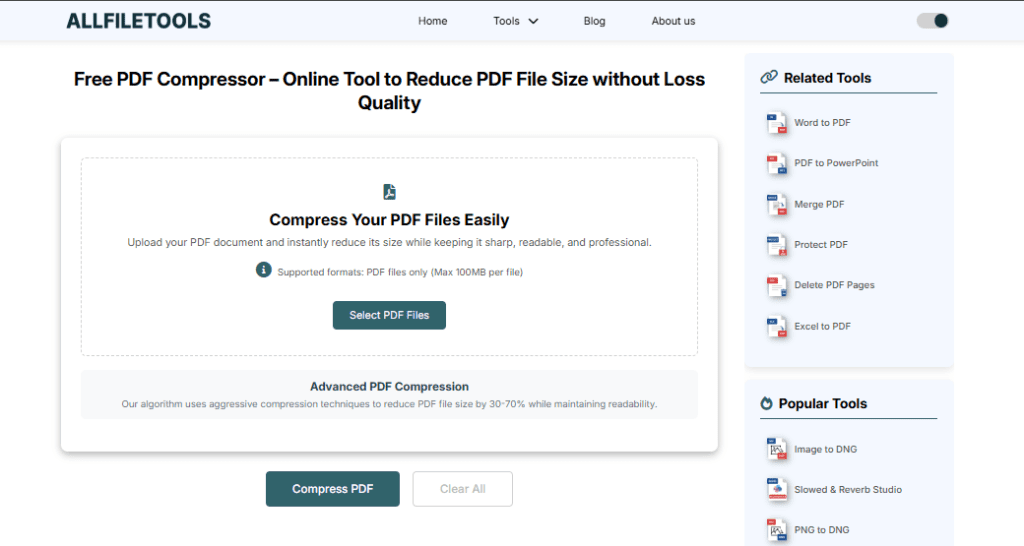
Using a PDF compressor is very easy. Most people use online tools because they are free and fast. Here is how you can do it in 4 simple steps:
- Step 1: Go to the PDF Compressor tool and click “Select File” to upload your heavy PDF.
- Step 2: Upload Your File Click the “Upload” or “Select File” button.
- Step 3: Click the “Compress” button and wait a few seconds for the tool to process the file.
- Step 4: Click “Download” to save your new, smaller PDF to you
Tips for Getting the Best Results
If you want the smallest file with the best quality, follow these tips:
- Remove Unnecessary Pages: Before compressing, delete any blank or useless pages.
- Avoid Scanning as Images: If you create a PDF, save it directly from Word or Google Docs. Scanned “photo” PDFs are always much heavier.
- Don’t Compress Multiple Times: If you compress an already compressed file, the quality will drop significantly. Do it once, and do it right.
The Future of PDF Files
As we move further into 2026, files are getting smarter. New AI-powered compressors can now look at a document and “understand” which parts are important. For example, they keep the text sharp while shrinking the background of a photo. This means we can have tiny files that still look perfect on big screens.
Frequently Asked Questions (FAQ)
1. Is PDF compression free?
Yes, most online tools allow you to compress 2 to 5 files per day for free. For unlimited files, they usually have a small fee.
2. Can I compress a PDF on my iPhone or Android?
Yes! You don’t need a computer. Just open your browser (Chrome or Safari) on your phone, go to a compression website, and follow the same steps.
3. What is the best file size for an email?
Try to keep your PDF under 5MB. This ensures the recipient can open it quickly even if they have a slow internet connection.
4. Will my password-protected PDF work?
Most compressors will ask you to enter the password first. Once you unlock it, the tool can shrink the file.
Conclusion
A PDF Compressor is a simple but powerful tool that makes digital life easier. It saves space, saves time, and helps you stay professional. Whether you are a student or a businessman, knowing how to shrink a file is a vital skill today.
So, the next time you see that annoying “File too large” error, don’t worry. Just find a compressor, squeeze that file, and hit send!
🔹 Explore more powerful file conversion and online utilities at AllFileTools –
🔹 For technical support, digital solutions, and expert services, visit LetDigitalFly IT Services –
🔹 Discover additional career and productivity resources at Resume Slip Builder –
