
Let’s be honest—if your business doesn’t have a website in 2026, you’re already behind. Whether you run a local coffee shop or a consulting firm, an online presence has become absolutely essential. Your potential customers are searching for you right now, and if they can’t find your website, they’re finding your competitor’s instead.
The internet has fundamentally changed how people discover and interact with businesses. A study shows that over 95% of consumers research businesses online before making a purchase decision. Your website isn’t just a nice-to-have anymore; it’s your digital storefront, your credibility marker, and your 24/7 sales assistant rolled into one.
In this guide, we’ll walk you through everything you need to know about website development—from understanding the basics to launching your first site. By the end, you’ll have a clear roadmap and the confidence to get your business online.
What is Website Development?
Before we dive deeper, let’s clarify what we’re actually talking about. Website development is the process of building and creating websites. For a deeper dive into this concept, check out our complete beginner’s guide. It involves several moving parts working together to create the online experience your visitors see and interact with.
Many people confuse web design with web development—and honestly, that’s understandable. Web design focuses on the visual appearance: colors, layouts, fonts, and user interface. Web development, on the other hand, is about the technical implementation: making buttons actually work, forms submit data, and pages load quickly.
Think of it this way: design is the blueprint, development is the construction.
Your website consists of three main technical components working together:
Frontend: This is what visitors actually see and interact with—the visual design, buttons, forms, and content. It’s built using HTML, CSS, and JavaScript.
Backend: This is the behind-the-scenes engine that makes your website function. It handles user requests, processes data, and communicates with databases.
Database: This is where your website stores all its information—customer data, blog posts, product details, and more.
You don’t necessarily need to understand the technical details, but knowing these exist helps you understand why some things cost more to build than others.
Types of Websites You Can Build
Not all websites are created equal, and choosing the right type matters. Here are the most common options:
Business Website
A professional site showcasing your company, services, and contact information. Perfect for freelancers, agencies, and established businesses wanting to establish credibility.
E-commerce Website
Designed specifically for selling products online. If you’re running a shop, Etsy won’t cut it forever—you’ll want your own platform.
Blog Website
Content-focused sites where you publish articles and build an audience. Great for thought leadership and driving traffic through search engines.
Portfolio Website
Ideal for creatives—designers, photographers, writers, and artists who need to showcase their work visually.
Landing Page Website
A single-page site focused on one specific goal: getting visitors to sign up, download something, or make a purchase.
Most business owners benefit from starting with a business website that includes a blog section. This gives you flexibility to grow and evolve as your needs change.
Key Steps in the Website Development Process
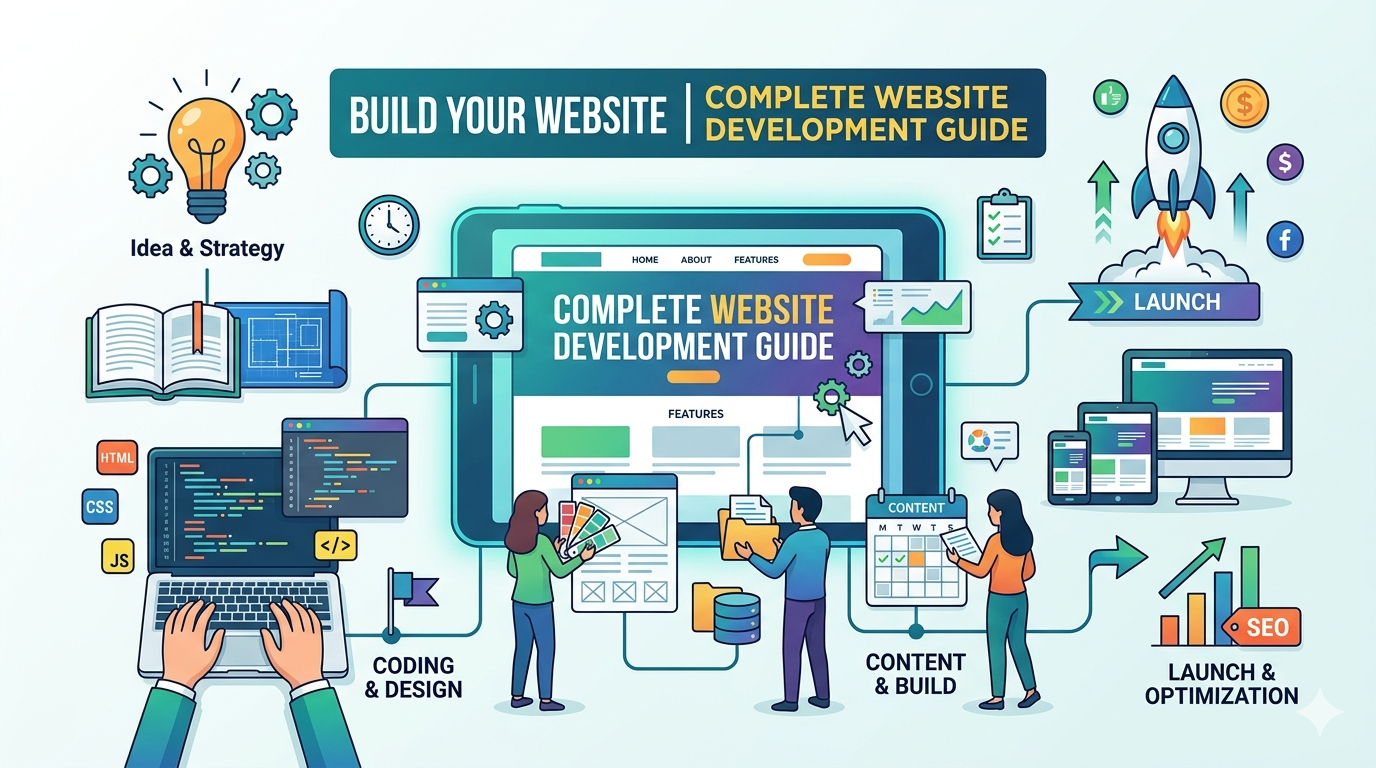
Now here’s the section that matters most. The website development process doesn’t have to be complicated, but it does require following a logical sequence. Let’s break down each step:
1. Planning Your Website Goals
Before touching any code or design tools, sit down and answer these questions: What do you want your website to achieve? Do you want sales, leads, or just information sharing? Who is your target audience? What should a visitor do when they land on your site?
This clarity guides every decision that follows. It’s the difference between a website that just exists and one that actually generates business results.
2. Choosing a Domain Name
Your domain name is your online address—like yourcompany.com. Spend time on this choice. It should be:
- Easy to remember and spell
- Relevant to your business
- Ideally under 15 characters
- Professional sounding
Register it through a domain registrar like GoDaddy, Namecheap, or Google Domains. Most cost around $10-15 annually.
3. Selecting Web Hosting
Your website needs to live somewhere on the internet—that’s what hosting provides. You’re essentially renting server space where your website files are stored. This choice affects your site’s speed and reliability.
Don’t get overwhelmed by technical jargon. For most small businesses, shared hosting ($5-15/month) works perfectly fine. Budget hosts like Bluehost or SiteGround offer beginner-friendly options.
4. Designing the Website Layout
Now the creative part begins. You’ll decide on your website’s structure: where the navigation goes, how many pages you need, what the homepage looks like. Many beginners use templates as a starting point—there’s no shame in that. You’re not reinventing the wheel; you’re just using proven design patterns.
5. Developing the Website
This is where your design becomes a functional website. Whether you’re using a platform like WordPress or hiring a developer, this step transforms visual mockups into working pages. Forms should submit, links should navigate, and everything should work smoothly across different devices.
6. Testing and Launching
Before going live, test everything. Click every link, fill out every form, check your site on phones and tablets. Test different browsers too. Does it load quickly? Does it look good? Only after thorough testing should you push the launch button.
Essential Features of a Successful Website
Your website needs certain core elements to be competitive. These features aren’t optional luxuries—they’re baseline expectations:
- Mobile-Friendly Design is non-negotiable. Over 60% of web traffic comes from mobile devices. If your site doesn’t look good on phones, you’re losing customers instantly.
- Fast Loading Speed matters more than you think. Visitors will bounce if pages take more than 3 seconds to load. Optimize images and use a quality hosting provider to ensure snappy performance.
- Easy Navigation means visitors should find information without frustration. Clear menus, logical structure, and a search function help users navigate intuitively.
- Clear Call-to-Action buttons tell visitors exactly what to do next: “Buy Now,” “Contact Us,” or “Sign Up.” Don’t make them guess.
- Contact Information should be easy to find. Display your phone number, email, and contact form prominently. Trust increases when people can reach you.
- Basic SEO Optimization helps people find your site through Google. Use relevant keywords, optimize page titles and descriptions, and create quality content. We’ll cover more on this later.
Website Development Platforms for Beginners
Fortunately, you don’t need to be a programmer anymore. Several platforms make website development for beginners accessible:
- WordPress powers nearly 45% of all websites. It’s flexible, beginner-friendly, and perfect if you want to grow beyond basic features. WordPress.com offers hosted solutions, while self-hosted WordPress gives more control.
- Shopify is purpose-built for e-commerce. If you’re selling products, Shopify handles payments, inventory, and shipping beautifully.
- Wix and Squarespace offer drag-and-drop builders. They’re intuitive and great for quick launches, though less flexible for customization.
- Webflow sits in the middle—more powerful than no-code platforms but still visual and beginner-accessible.
If you’re technically inclined, learning HTML, CSS, and JavaScript gives you unlimited possibilities, but it requires genuine time investment.
Common Website Development Mistakes to Avoid
Learn from others’ failures. Here are mistakes that haunt new websites:
- Ignoring mobile users costs you sales. Always design mobile-first.
- Slow loading times frustrate visitors and hurt your Google rankings.
- Poor navigation makes visitors bounce. Keep menus simple and logical.
- Skipping SEO optimization means nobody finds you through search engines—wasted potential.
- Weak security puts customer data at risk. Use HTTPS, keep software updated, and use strong passwords.
Website Development Checklist
Before launching, tick off each item. For a comprehensive version, check out our complete website development checklist for business owners:
- ✓ Domain name registered
- ✓ Web hosting selected
- ✓ Website structure planned
- ✓ Essential pages created (Home, About, Services, Contact, Privacy Policy)
- ✓ Mobile responsiveness tested
- ✓ All links verified
- ✓ Forms tested and working
- ✓ SEO basics implemented
- ✓ Loading speed optimized
- ✓ Security features enabled
- ✓ Final review completed
Conclusion
Website development doesn’t have to be intimidating. By following this website development process and understanding the steps to develop a website, you’re already ahead of many businesses still operating without an online presence.
Your website is an investment in your business’s future. Start with the fundamentals, launch when you’re ready, and improve over time. Perfection can wait—getting online can’t.
Ready to build? Start planning your website today. Your customers are waiting.
Need expert guidance? Visit BinaryMetrix to explore our complete website development services and resources to help you succeed online.