

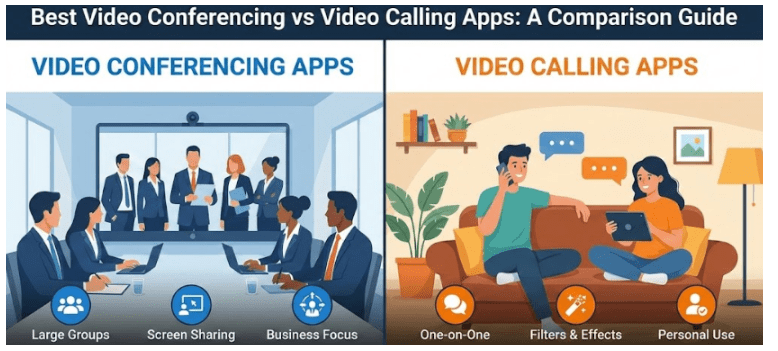
Imagine there are two meeting rooms- one is a very cozy café where you sit at a table for a quick chat, while the other one is a boardroom which is buzzing with strategy. Video calling is exactly that cozy space meant for personal exchanges, while video conferencing is the room that is meticulously engineered for ideas to collide.
Communication tools are not only confined to remote and hybrid work arrangements; they are essential for educators and even families living in different states. However, a majority of the individuals still confuse video conferencing apps with video calling apps.
While both of them enable face-to-face interaction via screen, they still serve distinctive purposes depending on the scale and functionality. Businesses looking to buy video conferencing software can partner with an authorized video conferencing software reseller, Wroffy. In this article, we will explore the best video conferencing and video calling apps, with a special emphasis on Microsoft Teams.
Major Differences Between Video Conferencing Vs Video Calling Apps
| Feature | Video Conferencing Apps | Video Calling Apps |
| Purpose | Designed for professional meetings and webinars. | Designed for personal communication. |
| Participants | Supports a large number of participants. | Generally supports 2-10 people at a time. |
| Features | Comprises screen sharing, recording, whiteboards, annotation tools and file sharing. | Confined to basic audio and video calls with few extra tools. |
| Security | Offers industry-level encryption and admin controls. | Offers basic security. |
| Integration | Integrates with productivity tools. | Limited or no integration. |
Top Video Conferencing Apps
1. Microsoft Teams
Microsoft Teams is one of the best video conferencing software for educators, enterprises, and independent professionals. It seamlessly integrates with Microsoft 365, therefore portraying itself as a complete and comprehensive solution for communication and collaboration.
Businesses looking to buy Microsoft teams software can partner with the top video conferencing software reseller, Wroffy. Teams supports up to 1000 participants in meetings. It offers features like file sharing, live captioning, whiteboard collaboration, and recording, as well as encryption and compliance for enterprise-grade security features.
2. Zoom
Zoom is another video conferencing software that is well-known for its reliability and scalability. It offers HD video and audio during meetings to meeting participants. Other features of Zoom include screen sharing, breakout rooms, and recording capabilities. It seamlessly integrates with Google Workspace and Slack. It also enables webinar hosting and virtual events.
3. Google Meet
Google Meet is a feasible video conferencing software that provides a secure and easy way to host meetings directly from your browser, without the need to install the app. It seamlessly works with Gmail and Google Workspace. It provides screen sharing and real-time features. It supports up to 500 participants. It is perfect for teams already leveraging Google tools.
Top Video Calling Apps
1. Skype
Skype is one of the most popular video calling apps that is used by individuals worldwide. It enables HD-quality audio and video communication. It allows free face-to-face and group video calls. It offers screen sharing and instant messaging options. It has file sharing and voice call options. It seamlessly works across desktop, mobile, and web.
2. WhatsApp
WhatsApp is not only a messaging app, but it also offers smooth, HD-quality video calls for up to 32 participants. It provides end-to-end encrypted video calls. It is available on mobile devices and desktops as well. Seamlessly integrates with the contacts from your phone. It is perfect for casual communication.
3. Face Time
FaceTime is available on Apple devices. It is well known for its simplicity and high-definition video quality. It supports up to 32 participants. It also provides secure and private end-to-end encryption.
Conclusion
Undoubtedly, both video conferencing and video calling apps enhance communication; their usability depends on the purpose. For professional meetings and webinars, one must use Microsoft Teams, the best video conferencing software.
On the other hand, one can use Skype for video calling. Before you buy video conferencing software, compare the video conferencing software price, features, and then connect with the top video conferencing software reseller, Wroffy.