

In today’s digital world, we deal with audio files every single day. Whether it is a voice note from a friend, a recording for a school project, or a song we love, sometimes one file is just not enough. We often find ourselves wanting to put two or more sounds together. This is where an Audio Joiner Online comes in.
If you are looking for the best way to combine your tracks into one single file without downloading heavy software, you are in the right place. This guide will explain everything you need to know about merging audio, why it’s useful, and how to do it like a pro.
What is an Audio Joiner Online?
An Audio Joiner Online (sometimes called an audio merger) is a simple digital tool. Its only job is to take different audio clips and “glue” them together. Think of it like a train. Each audio clip is a train car. The Audio Joiner is the hook that connects them all so they can travel together as one long train.
Because it is “Online,” you don’t need to buy an expensive computer or install a big program that makes your laptop slow. You just open your web browser (like Chrome or Safari), upload your files, and you are done!
Why Would You Need to Merge Audio Files?
You might wonder, “Why would I ever need to join audio tracks?” Well, there are many reasons! Here are a few common situations where an online merger saves the day:
1. Creating a Non-Stop Music Mix
Imagine you are having a birthday party. You have five favorite songs, but you don’t want a gap between them. By using an audio joiner, you can merge them into one long 15-minute track. The music never stops, and the party keeps going!
2. Making a Podcast
Podcasts are very popular now. Usually, a podcaster records the “Intro” (the beginning), the “Interview” (the middle), and the “Outro” (the end) at different times. An audio joiner helps them put these three pieces together to make a professional-sounding episode.
3. Combining Voice Notes
Sometimes we record many short voice notes on our phones. Instead of sending ten small files to someone, it is much better to join them into one clear message.
4. Better School or Office Presentations
If you are giving a presentation and have different sound effects or interviews to show, playing them one by one can be messy. Joining them into one file makes your presentation look (and sound) much more organized.
The Big Benefits of Using an Online Tool
There are two ways to join audio: using a “Desktop App” or an “Online Tool.” For most people, the online tool is much better. Here is why:
No Downloads Required
Most professional editing software is huge. It takes up a lot of space. An online audio joiner works in the “Cloud.” This means it uses the website’s power, not your computer’s power.
It Works on Any Device
Whether you have a Windows PC, a Mac, an iPhone, or an Android tablet, an online tool works exactly the same. All you need is an internet connection.
It is Usually Free
Most online mergers are free to use. You don’t have to sign up for a monthly subscription just to join two simple songs.
Very Simple to Use
Professional software has thousands of buttons that are hard to understand. An online audio joiner usually only has three buttons: Add, Merge, and Download. It is designed so that even a 4th-grade student can use it without help.
How Does an Audio Joiner Actually Work?
You don’t need to be a computer scientist to understand the process. Here is the “human” explanation of what happens behind the scenes:
- Decoding: When you upload your MP3 or WAV file, the tool “reads” the sound waves.
- Lining Up: The tool places the end of File A right at the start of File B.
- Crossfading (The Secret Sauce): Many good joiners use “Crossfade.” This means File A slowly gets quieter while File B slowly gets louder at the same time. This makes the transition smooth instead of a sudden “jump.”
- Encoding: The tool wraps the new long sound into a new file format and gives it back to you.
Step-by-Step Guide: How to Merge Your Audio Files
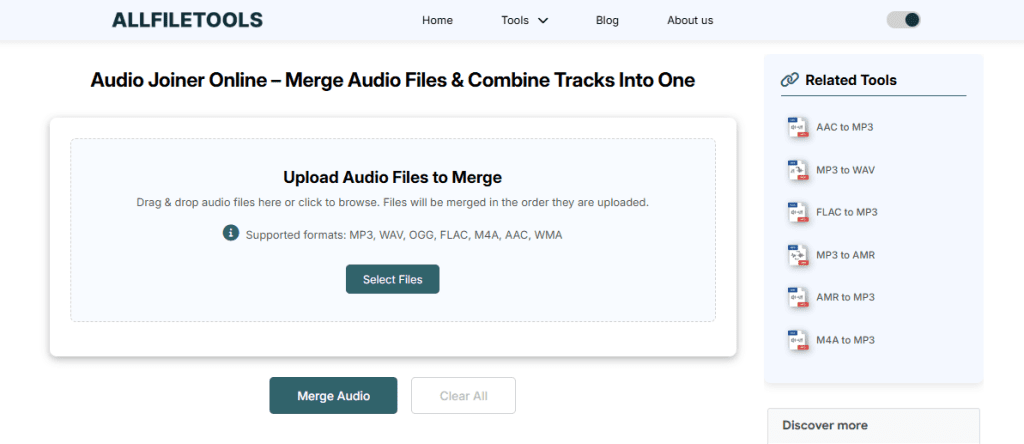
If you want to merge your files right now, here is the easiest way to do it. Just follow these simple steps:
- Step 1: Open your browser and go to a trusted site like AllFileTools.com. And use this tool Audio Joiner Online
- Step 2: Click “Select Files” or “Upload” to choose the audio tracks from your device.
- Step 3: Arrange your files in the order you want them to play (First, Second, Third).
- Step 4: Click the “Merge” or “Join” button and wait a few seconds for the tool to work.
- Step 5: Click “Download” to save your newly combined audio file to your computer or phone.
Common Audio Formats Explained (In Simple Terms)
When using an audio joiner, you will see different “Formats.” Here is a simple guide to what they mean:
- MP3: The king of audio. It’s small and sounds good. Use this for 99% of your tasks.
- WAV: Very high quality but very big files. Use this if you are a professional musician.
- M4A: Usually used by Apple/iTunes. It’s high quality but sometimes doesn’t play on old devices.
- AAC: Great for streaming and YouTube videos.
Is it Safe to Use an Online Audio Joiner?
Privacy is important. Many people worry, “Will the website keep my private recordings?”
A good, “Human-friendly” tool will have a clear privacy policy. Usually, these tools delete your files from their servers automatically after 1 or 2 hours. This ensures that your data is safe and no one else can listen to your recordings. Always look for a tool that uses HTTPS (the little lock icon in your browser address bar) to make sure your connection is secure.
Top Features to Look for in a Great Joiner
Not all tools are created equal. If you want the best experience, look for these features:
- Unlimited Files: Some tools only let you join two files. A great tool lets you join 10, 20, or even 50 tracks!
- No Quality Loss: The new file should sound just as clear as the originals.
- Fast Processing: You shouldn’t have to wait 10 minutes for a 2-minute song.
- Visual Waveforms: It is very helpful if you can see the “waves” of the sound. This helps you see exactly where one file ends and the next begins.
Tips for the Best Audio Quality
To make your merged file sound like it was made in a professional studio, keep these tips in mind:
- Use the Same Bitrate: If one file is high quality and the other is low quality, the final result might sound “weird.” Try to use files that are similar in quality.
- Check Your Volume: If “Part 1” is very loud and “Part 2” is very quiet, the listener will have to keep changing their volume. Try to make sure your recordings are at a similar loudness before joining.
- Silence is Golden: Sometimes it’s good to have 1 second of silence between tracks so the listener knows a new part has started.
Why Google Loves This Tool
For people who write about technology, an Audio Joiner Online is a “Helpful Content” topic. Google likes articles that solve a real problem for users. By explaining how to use this tool, we are providing “E-E-A-T” (Experience, Expertise, Authoritativeness, and Trustworthiness).
Users are constantly searching for “how to merge songs” or “online mp3 joiner.” By providing a clear, human-written guide like this, we help people find exactly what they need without getting confused by technical jargon.
Frequently Asked Questions (FAQ)
1. Can I join audio files on my mobile phone?
Yes! Since the tool is online, you can use it on any smartphone. Just open your mobile browser and follow the same steps.
2. Is there a limit to how big the file can be?
Most free tools have a limit (like 100MB or 500MB). For most people, this is more than enough for several hours of audio.
3. Can I trim the audio before joining it?
Many modern audio joiners also have a “Cutter” or “Trimmer” feature. This allows you to cut off the “umms” and “ahhs” or long silences before you join the files together.
4. Does merging files change the sound?
If you use a high-quality tool, the sound will stay exactly the same. The tool simply connects the data of one file to another.
Conclusion: The Easiest Way to Combine Sound
Joining audio doesn’t have to be a headache. You don’t need to be a tech genius or a sound engineer. With an Audio Joiner Online, the process is as simple as uploading a photo to social media.
Whether you are making a gift for a friend, a project for school, or a professional podcast, this tool is your best friend. It saves you time, saves your computer’s memory, and gives you a perfect result every time.
So, the next time you have a bunch of audio tracks laying around, don’t let them stay separate. Head over to an online joiner, click a few buttons, and create something amazing!
🔹 Explore more powerful file conversion and online utilities at AllFileTools –
🔹 For technical support, digital solutions, and expert services, visit LetDigitalFly IT Services –
🔹 Discover additional career and productivity resources at Resume Slip Builder –
